3-D Printers
AnkerMake M5C 3D Printer: The Speedy & Simple Powerhouse
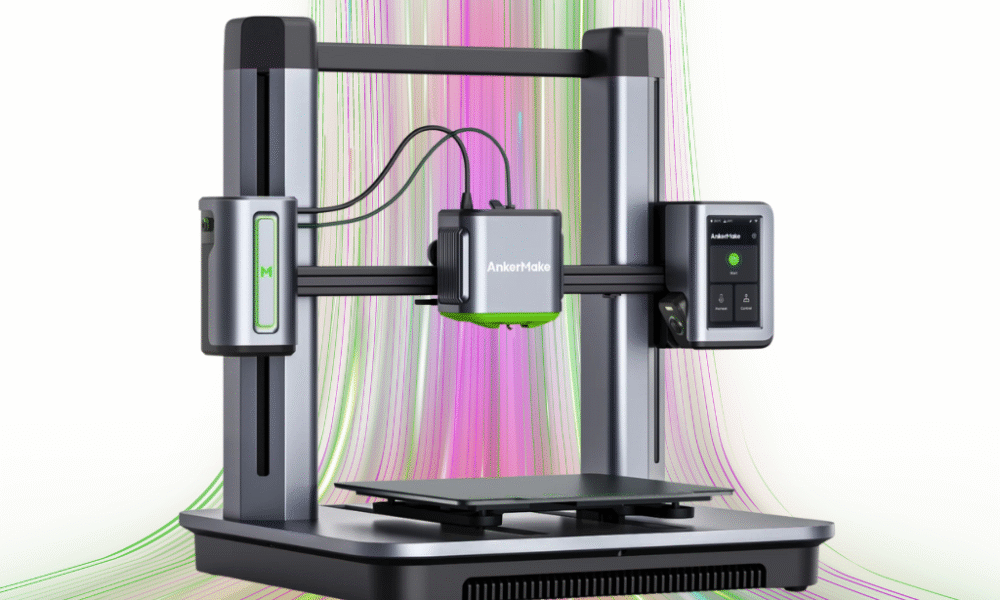
AnkerMake M5C 3D
For a long time, the world of 3D printing seemed to be a trade-off between speed, ease of use, and price. You could have two of the three, but never all. The AnkerMake M5C, however, challenges that notion. As a streamlined version of its larger sibling, the M5, the M5C arrives on the scene promising a new level of fast, reliable, and user-friendly printing at a price point that makes it accessible to a much wider audience. This review will dive into what makes this printer stand out and whether it’s the right choice for your next project.
Technical Specifications
| Feature | Specification |
|---|---|
| Print Technology | Fused Filament Fabrication (FFF) |
| Build Volume | 220×220×250 mm |
| Max Print Speed | 500 mm/s |
| Max Acceleration | 5000 mm/s2 |
| Nozzle Type | All-metal, 0.4 mm brass (interchangeable) |
| Max Nozzle Temp | $300^{\circ}$C |
| Max Bed Temp | $100^{\circ}$C |
| Filament Compatibility | PLA, PETG, TPU, ABS, PA, PLA-CF, PETG-CF, PA-CF |
| Bed Surface | PEI Soft Magnetic Plate |
| Connectivity | Wi-Fi, USB-C, Bluetooth |
| Weight | 9.6 kg |
Key Features
- Blazing Fast Printing: The M5C’s standout feature is its speed. With a maximum print speed of 500 mm/s and acceleration up to 5000 mm/s2, it can complete prints in a fraction of the time compared to traditional FDM printers, making it perfect for rapid prototyping and quick projects.
- One-Piece Aluminum Alloy Die-Casting: The printer’s body is a single, sturdy piece of aluminum. This design significantly reduces vibrations and flex during high-speed printing, ensuring superior print quality and stability.
- Automatic Bed Leveling: AnkerMake has implemented a reliable 49-point auto-leveling system that eliminates the need for tedious manual calibration. This feature, combined with a quick Z-offset calibration, ensures a perfect first layer every time.
- All-Metal Hotend: The M5C’s hotend can reach temperatures up to $300^{\circ}$C, which expands the range of compatible filaments. This allows users to experiment with more advanced materials like ABS and Nylon (though an enclosure is recommended for best results with these).
- Streamlined User Interface: Eschewing a built-in touchscreen, the M5C uses a single, customizable button and relies on the AnkerMake mobile and desktop app for all controls. This keeps the printer’s physical design simple and clean, with all management handled remotely.
Who It’s Best For
The AnkerMake M5C is an excellent choice for three groups of people:
- Hobbyists and Beginners: Its quick assembly (around 15 minutes), one-button operation, and automatic calibration make the M5C incredibly easy to get started with. You can spend more time designing and printing and less time tinkering.
- Those on a Budget: The M5C offers premium features like high-speed printing, a direct drive extruder, and a solid metal frame at a significantly lower price than many competitors.
- Engineers and Creators: The high speed is a game-changer for anyone who needs to quickly iterate on designs or produce functional prototypes.
Who May Not Like It
While the M5C is fantastic for many, it’s not a perfect fit for everyone.
- Users Who Prefer a Touchscreen: If you want to control your printer directly from the machine without a phone or computer, the M5C’s app-centric design may be a drawback.
- Those Who Need a Larger Build Volume: The 220×220×250 mm build area is standard, but those who frequently print very large models may find it limiting.
- Advanced Users Who Love to Tinker: The M5C is so well-integrated and user-friendly that it offers fewer options for deep-level customization and firmware tweaking than some other open-source printers.
Pros and Cons
| Pros | Cons |
|---|---|
| Extremely fast printing (up to 500 mm/s) | No built-in screen (app-dependent) |
| Quick 15-minute assembly | Smaller build volume than some competitors |
| Reliable auto-leveling | Lacks a built-in camera (available on M5) |
| Sturdy, die-cast aluminum frame | Less room for deep customization |
| All-metal hotend ($300^{\circ}$C) | Only one button on the printer |
| Affordable price point |
Competitor Comparison Chart
| Feature | AnkerMake M5C | Bambu Lab A1 Mini | Creality Ender-3 V3 KE |
|---|---|---|---|
| Price | ~$399 | ~$299 (+$150 for AMS) | ~$279 |
| Max Speed | 500 mm/s | 500 mm/s | 500 mm/s |
| Build Volume | 220×220×250 mm | 180×180×180 mm | 220×220×240 mm |
| Key Features | Unibody design, high-temp nozzle | Active noise cancellation, AMS for multi-color (optional) | Touchscreen, X-axis linear rail |
| Connectivity | Wi-Fi, Bluetooth, USB-C | Wi-Fi, MicroSD | Wi-Fi, LAN, USB |
| User Interface | App-based, single button | 2.4-inch IPS touchscreen | 4.3-inch color touchscreen |
Q&A
Q: Can I use third-party filaments? A: Yes, the M5C is compatible with any standard 1.75mm filament from any brand. Its $300^{\circ}$C hotend also allows for a wider range of materials.
Q: Is the printer loud when it’s printing fast? A: The high-speed printing does generate more noise, but AnkerMake has implemented features to minimize vibration. It’s generally comparable to other high-speed printers in its class.
Q: What slicer software can I use? A: You can use the dedicated AnkerMake Slicer, or you can use popular third-party options like PrusaSlicer and Ultimaker Cura.
Q: Do I need to buy an enclosure? A: For materials like PLA and PETG, an enclosure is not necessary. However, if you plan to print with filaments like ABS or Nylon, an enclosure is highly recommended to prevent warping and cracking.

