3-D Printers
Bambu Lab X1C Combo 3D Printer Review: A Revolution in Desktop 3D Printing
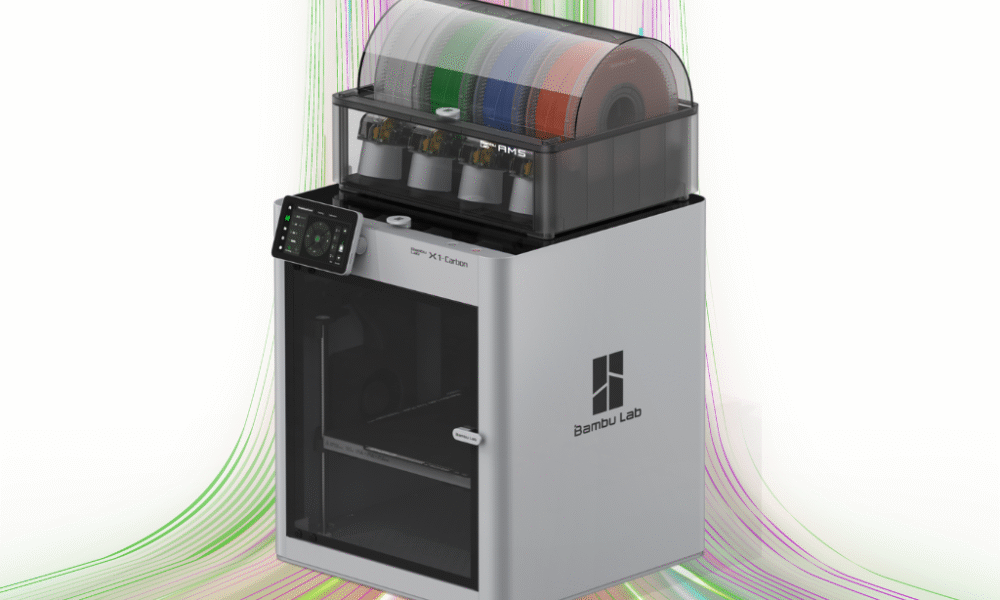
Bambu Lab X1C Combo 3D Printer Review
Welcome to The Tech Review, where we dive deep into the latest gadgets and technology to help you make informed decisions. Today, we’re putting one of the most talked-about machines in the 3D printing world to the test: the Bambu Lab X1C Combo. Since its launch, this printer has been praised for its speed, automation, and ability to “just work” right out of the box, something that has historically been a challenge for many desktop FDM printers. But does it live up to the hype? Let’s find out.
The Bambu Lab X1 Carbon Combo is a fully-enclosed, high-speed CoreXY 3D printer that bundles the X1 Carbon with the Automatic Material System (AMS). The AMS is the star of this combo, enabling multi-color and multi-material printing, a feature previously reserved for very expensive industrial machines or complex DIY setups. From the moment you unbox it, the experience feels different. It arrives fully assembled, and after a quick unboxing and a few screw removals, the printer’s automated setup process handles the rest, including a dual auto bed leveling routine that uses both a Micro Lidar sensor and an analog force sensor for unparalleled precision.
This printer is a powerhouse, boasting a maximum toolhead speed of 500 mm/s and acceleration of 20,000 mm/s². These speeds, combined with a 7 μm Lidar resolution, Active Vibration Compensation (AVS), and a hardened steel nozzle, allow it to produce incredibly fast prints without sacrificing quality. The AI-powered first layer inspection and “spaghetti” failure detection are game-changers, actively monitoring for common print issues and pausing the job to prevent wasted filament and time. This level of automation means you can confidently start a print and walk away, a major shift from the constant tinkering required by many other printers.
For more advanced users, the Bambu Lab X1C Combo supports a wide range of materials, including PLA, PETG, ABS, ASA, TPU, and more exotic filaments like PA, PC, and carbon/glass fiber reinforced polymers. The included hardened steel nozzle and all-metal hotend (capable of reaching 300°C) make printing with these abrasive materials a breeze. The AMS unit also keeps your filament dry, which is essential for successful prints with hygroscopic materials. While multi-color printing is a fantastic feature, it’s worth noting that it can be a slow process due to the filament purging required for color changes, which also results in a significant amount of plastic waste (the infamous “poop chute”).
The Bambu Lab software ecosystem—including the Bambu Studio slicer and the Bambu Handy mobile app—is incredibly polished and user-friendly. The integration is seamless, allowing for remote printing and monitoring with the built-in 1080p camera. While this cloud-based approach is convenient, it’s a point of contention for some users who prefer open-source hardware and local control for security and long-term viability. However, for the average user, the “it just works” philosophy of the Bambu Lab ecosystem is a massive selling point.
Features & Specifications
- Technology: Fused Deposition Modeling (FDM)
- Motion System: CoreXY with Carbon Fiber Rails
- Build Volume: 256×256×256 mm³
- Max Speed of Toolhead: 500 mm/s
- Max Acceleration: 20,000 mm/s²
- Nozzle: 0.4 mm Hardened Steel (included), 0.2, 0.6, 0.8 mm (optional)
- Max Hot End Temperature: $300^{\circ}$C
- Max Build Plate Temperature: $120^{\circ}$C
- Build Plate Surface: Bambu Textured PEI Plate or Bambu Cool Plate
- Supported Filaments: PLA, PETG, TPU, ABS, ASA, PVA, PET, PA, PC, Carbon/Glass Fiber Reinforced Polymer
- Auto-Leveling: Dual Auto Bed Leveling (Lidar & Force Sensor)
- AI Features: First Layer Inspection & Spaghetti Detection
- Camera: Built-in 1080p camera for remote monitoring and timelapse
- Connectivity: Wi-Fi, MicroSD Card
- Included: Automatic Material System (AMS) for 4-color printing
- Display: 5-inch color LCD touchscreen
- Dimensions: 389×389×457 mm³ (without AMS)
Who Is This Printer Best For?
The Bambu Lab X1C Combo is an excellent choice for a wide range of users, but it particularly shines for those who value speed, automation, and ease of use over the ability to tinker.
- Hobbyists who want a “just works” machine: If you’re a maker or hobbyist who wants to spend more time designing and less time calibrating and troubleshooting, the X1C is perfect.
- Professionals and small businesses: The printer’s reliability, speed, and ability to handle engineering-grade filaments make it ideal for creating prototypes, functional parts, and high-quality models in a professional setting.
- Anyone new to multi-color printing: The AMS simplifies what has traditionally been a very difficult process, making multi-color projects accessible to a much broader audience.
Pros and Cons
| Pros | Cons |
|---|---|
| Blazing Fast Speeds: Drastically reduces print times compared to conventional printers. | High Price Tag: Positioned at the higher end of the consumer market. |
| Exceptional Out-of-the-Box Experience: Arrives fully assembled and ready to print with minimal setup. | Closed-Source Ecosystem: Limits user customization and third-party parts. |
| Automated & Intelligent: Features like Lidar and AI detection save time and filament by preventing print failures. | Significant Filament Waste: Multi-color printing requires purging, creating a “poop chute” of wasted plastic. |
| Multi-Color & Multi-Material: The AMS system provides a seamless and reliable way to print with up to 4 filaments at once. | Proprietary Parts: Replacement parts must be sourced directly from Bambu Lab, which can be a single point of failure. |
| Robust & High-Quality Prints: The CoreXY system and rigid frame ensure consistent, high-quality results. | Cloud Dependency: The software ecosystem is heavily reliant on cloud services for remote functionality. |
| Wide Material Compatibility: Can print with a variety of standard and advanced filaments. | Noise: Can be loud at top speeds. |
Competitor Comparison
| Feature | Bambu Lab X1C Combo | Prusa MK4 | Creality K1 |
|---|---|---|---|
| Price (approx.) | $1,449 | $1,099 (assembled, single color) + $299 (MMU3) + Enclosure | ~$699 |
| Core Technology | CoreXY (fast) | Bed Slinger (slower) | CoreXY (fast) |
| Multi-Color/Material | Yes, with included AMS (up to 4) | Yes, with optional MMU3 (up to 5) | No |
| Automation | Highly automated (Lidar, AI detection) | Advanced (Nextruder, Load Cell) | Basic |
| Max Speed | 500 mm/s | 300 mm/s (with input shaping) | 600 mm/s |
| Enclosure | Fully Enclosed | Optional | Fully Enclosed |
| Open/Closed Source | Closed Source | Open Source | Open/Closed Hybrid |
| Community Support | Growing, active | Extensive, well-established | Extensive, well-established |
Q&A
Q: Is the Bambu Lab X1C Combo suitable for a beginner? A: Yes, absolutely. While it’s a high-end, professional-grade machine, its plug-and-play nature and comprehensive automation make it an incredibly forgiving and user-friendly experience for beginners. The “just works” philosophy is a huge advantage for those who don’t want to spend their time troubleshooting.
Q: What is the main difference between the X1C Combo and the P1S Combo? A: The main differences lie in the features. The X1C includes a Lidar sensor for advanced bed leveling and first-layer inspection, a built-in camera, and a full-color touchscreen. It also has a hardened steel nozzle and more robust cooling, making it better suited for abrasive filaments. The P1S is essentially a more budget-friendly version that sacrifices these premium features for a lower price point while maintaining the high-speed core functionality and AMS compatibility.
Q: How much filament is wasted with multi-color printing? A: The amount of waste depends on the design of the model. The AMS system purges a small amount of filament during each color change to prevent color mixing, creating a small “poop” of plastic. For a two-color print, this is manageable, but for a four-color print with many color changes, the waste can be significant. However, for many users, the convenience of not having to manually swap filaments outweighs this downside.
Q: Can I use third-party filaments with the AMS? A: Yes, you can. While the Bambu Lab filaments have RFID tags that allow the printer to automatically apply the correct settings, you can manually configure the filament type and color for any third-party brand. The AMS is designed to work with most standard 1.75 mm filament spools.
Q: What is the Lidar sensor used for? A: The Micro Lidar sensor is a key feature of the X1C. It is used to perform a high-precision first-layer scan to ensure proper adhesion and detect any imperfections. It also helps with flow calibration and provides a redundant check to the bed leveling process, ensuring consistently perfect first layers.
Q: Is the cloud connectivity a problem? A: This is a matter of personal preference. Cloud connectivity enables the printer’s most convenient features, like remote printing and monitoring via the mobile app. However, it means your printer is dependent on Bambu Lab’s servers. It is possible to use the printer with local network mode by sending files via a microSD card, but you would lose some of the remote functionality.
Q: How is the maintenance on the Bambu Lab X1C Combo? A: The X1C is a very complex, yet modular, machine. It’s not designed for the same level of tinkering as open-source printers like the Prusa MK4. Most repairs involve replacing an entire assembly (e.g., the hotend), which is a quick and straightforward process. While this makes it easy for the average user, it can be a turn-off for those who prefer to repair individual components.
Q: How does the “spaghetti detection” work? A: The built-in AI is trained to recognize the common patterns of a print failure, often referred to as “spaghetti.” If the AI detects a print has failed and is creating a tangled mess of filament, it will automatically pause the print and send a notification to the user, preventing a huge mess and saving a lot of filament.


Visit our 3D printer catagory for more 3D Printer Reviews