3-D Printers
Creality K1C 3D Printer: A Comprehensive Review
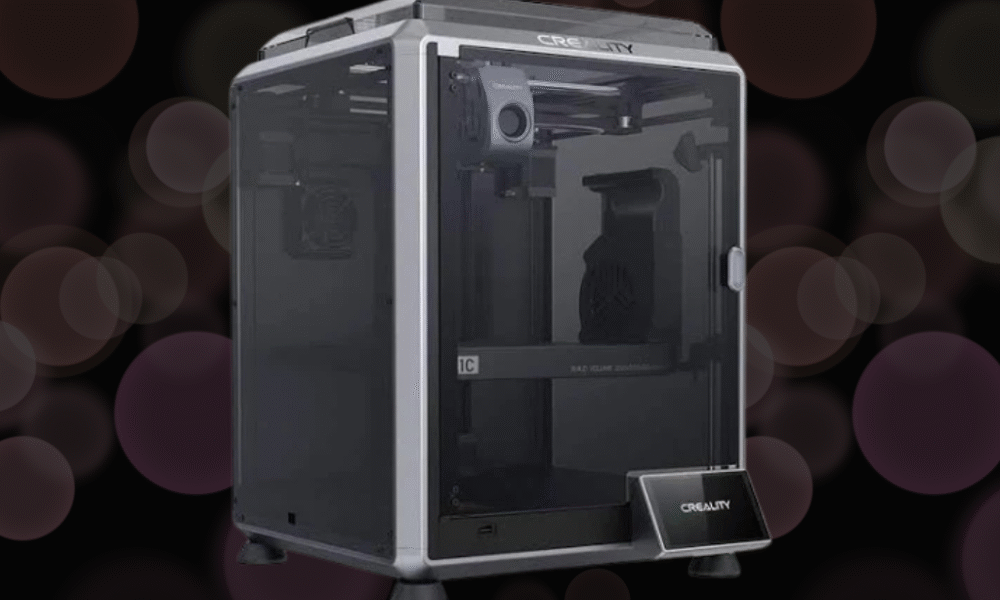
The 3D printing landscape has evolved dramatically over the past few years, with manufacturers racing to deliver faster, more reliable, and user-friendly machines. Creality, a household name in the maker community, has thrown its hat into the high-speed printing ring with the K1C. This printer represents a significant departure from Creality’s traditional Ender series, embracing enclosed design, CoreXY kinematics, and impressive speed claims. After extensive testing, here’s my in-depth look at what the K1C brings to the table.
First Impressions and Unboxing
The K1C arrives in a surprisingly compact box considering it’s a fully enclosed printer. Creality has done an excellent job with packaging—every component is snugly fitted with foam inserts, and there’s minimal risk of damage during shipping. The unboxing experience feels premium, which is a nice touch at this price point.
Inside the box, you’ll find the printer itself, a spool holder, tools, spare parts, a scraper, and a USB drive with test files and documentation. The printer comes mostly assembled, which dramatically reduces setup time compared to kit-style printers. This is clearly aimed at users who want to get printing quickly rather than those who enjoy the building process.
Design and Build Quality
The K1C features a fully enclosed metal frame with acrylic panels, which immediately sets it apart from open-frame designs. The enclosure serves multiple purposes: it maintains consistent temperatures for better print quality with materials like ABS and ASA, reduces noise, and provides an added layer of safety. The build volume of 220 x 220 x 250mm is respectable for a printer in this class, though not the largest available.
The CoreXY motion system is one of the K1C’s defining features. Unlike traditional bed-slingers where the print bed moves in the Y-axis, CoreXY printers keep the bed stationary on the Z-axis while two motors work in tandem to move the print head in the X and Y directions. This design enables the impressive speeds Creality advertises—up to 600mm/s with acceleration rates of 20,000mm/s². In practice, you’ll typically print between 150-300mm/s, but even these speeds represent a massive improvement over traditional FDM printers.
The build quality is solid overall. The frame feels rigid with minimal wobble, and the panels fit together reasonably well. However, some users have reported minor gaps in panel alignment, though this doesn’t seem to affect print quality. The machine has a nice weight to it, which helps with stability during those high-speed prints.
Setup and Calibration
Getting the K1C up and running is refreshingly straightforward. After removing the packaging materials and protective films, you’ll need to install the spool holder, load filament, and run through the initial calibration routine. The entire process takes roughly 30 minutes if you’re methodical about it.
The printer features automatic bed leveling with a strain gauge sensor, which is a significant convenience feature. The bed leveling process creates a mesh that compensates for any minor irregularities in the build surface. While the system works well, I found it beneficial to occasionally verify the first layer and make minor Z-offset adjustments through the touchscreen interface.
One standout feature is the input shaping calibration. The K1C uses an accelerometer to measure resonances in the printer’s frame and automatically adjusts the firmware to compensate. This technology, borrowed from the high-end Voron and Klipper community, helps maintain print quality at higher speeds by reducing ghosting and ringing artifacts.
Print Quality and Performance
This is where the K1C truly shines. The print quality at moderate speeds (150-200mm/s) is exceptional. Layer lines are consistent, overhangs handle well up to about 60 degrees without support, and bridging performance is impressive. The 0.4mm brass nozzle that comes standard produces clean details, and the printer handles intricate geometries with confidence.
When you push the speeds higher—into the 250-300mm/s range—quality remains surprisingly good, though you’ll start to see minor compromises. Fine details may soften slightly, and you might notice increased ringing on sharp corners despite the input shaping. However, for functional parts where speed matters more than aesthetics, these speeds are absolutely viable.
The heated bed reaches 100°C quickly, typically in under five minutes, and maintains temperature consistently. The PEI-coated spring steel build plate provides excellent adhesion for most materials, and prints pop off easily once the bed cools. I’ve tested PLA, PETG, ABS, and TPU, and all performed admirably with appropriate settings.
The enclosed design really benefits higher-temperature materials. ABS prints came out with minimal warping, and layer adhesion was strong. The chamber doesn’t actively heat beyond what the bed and hotend provide, but the passive warming is sufficient for most applications.
The Hotend and Extrusion System
The K1C features a direct drive extruder with a titanium alloy heatbreak and ceramic heater. The hotend can reach 300°C, which opens the door to engineering materials like nylon and polycarbonate. The all-metal hotend design means you won’t have PTFE tube degradation issues at higher temperatures.
The extrusion system is robust and handles flexible filaments better than many Bowden-style printers. I successfully printed TPU at 40mm/s without issues, which speaks to the quality of the extruder design. Filament loading and unloading are straightforward, though the quick-release mechanism occasionally requires an extra press to fully engage.
User Interface and Connectivity
The K1C sports a 4.3-inch color touchscreen that’s responsive and intuitive. The menu system is logically organized, making it easy to adjust temperatures, start prints, and modify settings. The interface shows real-time information including temperatures, print progress, and estimated time remaining.
Connectivity options include USB drive, USB cable to computer, and Wi-Fi. The Wi-Fi functionality is particularly convenient—you can send files to the printer over your network using Creality Cloud or through your slicer of choice. The integration works smoothly, though I experienced occasional connection drops that required reconnecting to my network.
Creality Cloud offers remote monitoring through a built-in camera, allowing you to check on prints from your phone. The camera quality is adequate for monitoring, though not high-definition. Time-lapse functionality is built in, which is a fun addition for sharing your prints on social media.
Noise Levels
One area where the K1C impresses is noise management. The enclosure naturally dampens sound, and the fans, while audible, aren’t particularly loud. During printing, the machine produces a gentle whirring rather than the aggressive mechanical sounds of many 3D printers. At typical speeds, it measures around 50-55 dB, which is roughly equivalent to a normal conversation. You could feasibly run this printer in a home office without it being overly disruptive.
Software and Slicing
The K1C runs Klipper firmware, which is a significant advantage. Klipper is highly regarded in the 3D printing community for its advanced features and flexibility. However, accessing these features requires some technical knowledge, as Creality has simplified the interface for general users.
For slicing, Creality provides profiles for Creality Print (their branded version of Cura), but the printer works with any slicer that supports Klipper. I primarily used Cura and PrusaSlicer with custom profiles, both of which worked excellently. The learning curve involves understanding how to balance speed, acceleration, and cooling for optimal results.
Maintenance and Reliability
After several months of regular use, the K1C has proven reliable with minimal maintenance required. The belt tension remains consistent, and I haven’t needed to re-tighten anything. The nozzle should be cleaned periodically, and checking for loose screws after heavy use is good practice.
One consideration is that the high-speed printing does put more wear on components than traditional printers. The fans work harder, and belts experience more stress. Creality provides decent documentation for common maintenance tasks, and replacement parts are readily available.
The biggest frustration I’ve encountered involves the bed adhesion surface. After hundreds of hours of printing, the PEI coating shows wear in the center where most prints occur. A replacement sheet isn’t expensive, but it’s an ongoing cost to factor in.
Value Proposition
Priced in the mid-range segment, the K1C represents solid value for what you’re getting. You’re receiving an enclosed CoreXY printer with advanced features like input shaping, auto-leveling, and Klipper firmware at a price point that undercuts many competitors. When you consider the speed capabilities and print quality, it becomes an attractive option for both hobbyists looking to upgrade and small businesses needing production capability.
That said, it’s not without competition. Bamboo Lab’s printers offer similar speeds with arguably more polished software experiences, while Prusa’s latest offerings provide legendary reliability with different trade-offs. The K1C carves out its niche by offering excellent performance at an accessible price.
Who Should Buy the K1C?
The Creality K1C is ideal for intermediate to advanced users who want high-speed printing without breaking the bank. If you’re upgrading from an Ender 3 or similar printer, the jump in capability will be dramatic. The printer is also well-suited for small businesses or makers who need to produce parts quickly without sacrificing too much quality.
Absolute beginners might find the speed and features somewhat overwhelming initially, though the printer is certainly usable out of the box. Those who enjoy tinkering will appreciate the Klipper firmware and the ability to modify and tune settings extensively.
Final Verdict
The Creality K1C represents a strong entry in the high-speed 3D printer market. It delivers on its core promises: fast printing speeds, good quality output, and a feature set that punches above its price point. The enclosed design, CoreXY kinematics, and Klipper firmware create a compelling package that handles a wide range of materials and applications.
While it’s not perfect—the software experience could be more polished, and build quality has minor inconsistencies—these are relatively minor quibbles in the context of what the printer achieves. For anyone looking to significantly reduce print times while maintaining quality, the K1C deserves serious consideration. It’s a printer that makes high-speed 3D printing accessible without requiring a premium price tag, and that’s exactly what the market needs right now.


Visit our 3D printer catagory for more 3D Printer Reviews