
Home Tech
Google’s October 1 Smart Home Revolution: Everything Announced Today
Google Devises
Google has officially launched its most ambitious smart home update in years, introducing Gemini AI across its entire ecosystem alongside new hardware designed specifically for the next generation of home intelligence.
Gemini for Home Arrives
The most significant announcement is Gemini for Home, Google’s AI-powered replacement for Google Assistant on speakers and smart displays. This represents a fundamental shift in how users interact with their smart home devices, moving from rigid voice commands to natural, conversational AI.
What’s New With Gemini for Home
The basic Gemini for Home voice assistant comes free with all compatible devices, maintaining the familiar “Hey Google” wake phrase while delivering dramatically improved capabilities. Users can now speak naturally without memorizing specific command structures, and the AI handles complex, multi-step requests with contextual understanding.
For more advanced features, Google introduced Google Home Premium, a new subscription starting at $10 per month (also included with Google AI Pro and Ultra subscriptions). Premium unlocks:
- • Gemini Live: Fully conversational mode without repeated wake words, enabling natural back-and-forth discussions for everything from meal planning to troubleshooting
- • AI-powered notifications: Detailed alerts that explain what’s actually happening (like “dog jumps out of playpen” instead of just “motion detected”)
- • Home Brief: Daily summaries that condense hours of camera footage into quick, digestible overviews with relevant video clips
- • Ask Home video search: Natural language queries like “What happened to the vase in the living room?” return relevant video clips
- • Automation creation: Set up complex smart home routines using simple voice commands
The rollout begins in late October with early access for existing Google Nest speakers and displays in the United States, Canada, the United Kingdom, Ireland, and Australia.
New Hardware: Built for Gemini
Next-Generation Nest Cameras
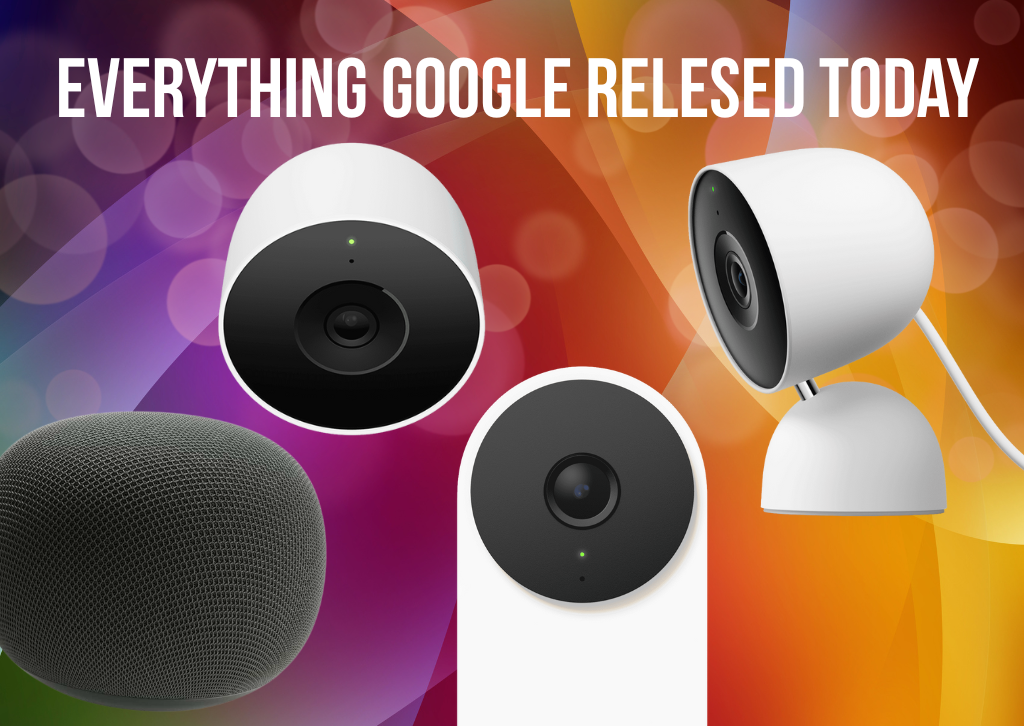
Google unveiled three new wired camera products, marking the first refresh of its security lineup in four years:
Nest Cam Indoor (3rd Gen) – $99.99
- • 2K HDR video resolution
- • 152-degree diagonal field of view
- • Available in Snow, Hazel, and Berry
- • Improved low-light performance
Nest Cam Outdoor (2nd Gen) – $149.99 (also available in two-pack for $249)
- • 2K HDR video resolution
- • 152-degree diagonal field of view
- • IP65 weather resistance
- • Available in Snow and Hazel
Nest Doorbell (3rd Gen) – $179.99
- • 2K HDR video resolution
- • 166-degree diagonal field of view with 1:1 aspect ratio
- • Head-to-toe coverage with ground-level package detection
- • Available in Snow, Hazel, and Linen
All three cameras earned first-in-class rankings from DXOMARK for image quality and feature significant hardware upgrades, including wider apertures for better low-light performance and new sensors. The devices have six hours of free event video history (doubled from the previous generation) and built-in intelligent alerts for people, vehicles, animals, and packages.
Google Home Speaker – Coming Spring 2026
Google previewed its new Google Home Speaker, the first audio device engineered specifically for Gemini. Key features include:
- • $99 price point
- • 360-degree balanced audio
- • Dynamic LED light ring showing Gemini’s listening, thinking, and responding states
- • Support for stereo pairing and multi-room grouping
- • Surround sound pairing with Google TV Streamer
- • Available in Porcelain, Hazel, Jade, and Berry
- • Made with recycled materials and 3D-knitted fabric that reduces waste
The speaker launches in Spring 2026 across the United States, Canada, United Kingdom, Ireland, France, Germany, Spain, Italy, Netherlands, Denmark, Norway, Sweden, Finland, Belgium, Switzerland, Austria, Japan, Australia, and New Zealand.
Expanding the Platform: Walmart Partnership
In a significant strategic move, Google announced its first partner devices through a collaboration with Walmart’s onn brand:
Indoor Camera Wired – $22.96 onn Video Doorbell Wired – $49.86
These budget-friendly options work seamlessly in the Google Home app with 1080p resolution, intelligent alerts, and access to Gemini for Home camera features through Google Home Premium. They’re available today at Walmart stores and online.
This partnership marks the beginning of Google’s platform expansion strategy, with the company launching a dedicated program for camera manufacturers. The initiative includes hardware reference designs, recommended components, and a Google Home camera embedded SDK to help partners build AI-powered cameras compatible with the ecosystem.
Sustainability and Design
Environmental responsibility features prominently in today’s announcements. The outdoor camera and doorbell use reformulated resin with UV protection that eliminates the need for paint. All packaging is 100% plastic-free, using recyclable paper and molded fiber. The new Google Home Speaker incorporates recycled materials and features 3D-knitted fabric that significantly reduces manufacturing waste.
Availability
The new Nest cameras and doorbell are available starting today at the Google Store and major retailers across 18 countries including the United States, Canada, Australia, Japan, and most of Europe. Gemini for Home features will begin rolling out to new device owners immediately in select markets, with broader international availability in early 2026.
Existing Google Nest speaker and smart display owners can expect Gemini for Home access through an early access program beginning in late October.
The Bottom Line
Today’s announcements represent Google’s most comprehensive smart home update since the original Google Home launch. By combining advanced AI capabilities with significantly improved hardware and an expanded partner ecosystem, Google is positioning itself to compete more effectively against Amazon’s Alexa and Apple’s HomeKit.
The question now is whether Gemini can deliver on its promise of more reliable, intelligent home automation after years of Google Assistant frustrations. With advanced reasoning capabilities, natural language processing, and genuinely useful AI features like video search and automated summaries, the foundation appears solid. The real test will be whether Google can maintain this momentum and avoid the performance degradation that plagued Assistant.
For smart home enthusiasts who’ve grown frustrated with the limitations of existing voice assistants, today marks the beginning of what could be a genuine transformation in how we interact with connected homes.

Check out all our in-depth home tech reviews




Home Tech
🔋 Powering Up: A Look at the Jackery Explorer 2000 Plus

The Jackery Portable Power Station Explorer 2000 Plus is a modular and powerful solution designed for off-grid living, extended camping, RV use, and home emergency backup. Featuring a robust 2042.8 Wh LiFePO4 battery and a high-power AC output, this unit is built for heavy-duty appliances and long-term reliability.
The 2000 Plus stands out primarily for its modularity and the use of the LiFePO4 (Lithium Iron Phosphate) battery chemistry. The LiFePO4 batteries offer an extended lifespan, typically rated for 4,000 charge cycles to 70%+ capacity, significantly outlasting older lithium-ion technologies. Its core capacity can be greatly expanded by adding up to five external Battery Pack 2000 Plus units, allowing for a total system capacity of up to 12 kWh in a single unit setup, or a massive 24 kWh when two Explorer 2000 Plus units are connected in parallel.
With a substantial 3,000W continuous AC output (and a 6,000W surge peak), the Explorer 2000 Plus can handle nearly all common home appliances, from refrigerators and microwaves to power tools. Furthermore, its fast-charging capability allows it to be fully recharged from a wall outlet in approximately 2 hours, or in the same timeframe using six 200W Jackery SolarSaga panels. Portability is aided by a telescoping handle and built-in wheels, making the 62.3 lbs unit manageable despite its size.

👍 Pros and 👎 Cons
| Pros | Cons |
| LiFePO4 Battery (4,000 cycles to 70%+) | Heavy (approx. 62.3 lbs) – mitigated by wheels |
| High Output (3,000W continuous / 6,000W surge) | Expensive (particularly when adding expansion batteries) |
| Massive Expandability (Up to 24 kWh with dual unit setup) | Basic Display (lacks touchscreen, can be hard to see in bright sun) |
| Extremely Fast AC Charging (Fully charges in ~2 hours) | Limited Connections (fewer ports than some competitors) |
| Telescoping Handle and Wheels for mobility | Requires Jackery’s proprietary solar panels for guaranteed performance |
| EPS Functionality (Emergency Power Supply) | Lacks wireless charging capability |

🆚 Competitor Comparison
The Explorer 2000 Plus competes directly with other high-capacity, modular solar generators. Here’s a comparison against some key rivals, the EcoFlow DELTA Pro and the Bluetti AC200MAX, focusing on core specs.
| Feature | Jackery Explorer 2000 Plus | EcoFlow DELTA Pro | Bluetti AC200MAX |
| Base Capacity | $\approx 2043$ Wh (LiFePO4) | $3600$ Wh (LiFePO4) | $2048$ Wh (LiFePO4) |
| Max Expandable Capacity | Up to $24$ kWh (Dual Unit) | Up to $25$ kWh | Up to $8192$ Wh |
| AC Output (Continuous) | $3000$ W | $3600$ W | $2200$ W |
| AC Charging Speed (Wall) | $\approx 2$ hours to full | $\approx 1.9$ hours to full | $\approx 4.5$ hours to full |
| Portability Aids | Wheels and Telescoping Handle | Wheels and Extendable Handle | Fixed Handles Only (Heavier to lift) |
| 240V Output | Yes (Requires Expansion Hub & second unit) | Yes | Yes (Via separate accessories) |
The Explorer 2000 Plus differentiates itself with its slightly more compact size and LiFePO4 durability. However, the EcoFlow DELTA Pro offers a larger base capacity and higher continuous output. The Bluetti AC200MAX offers strong all-around performance at a potentially lower price point.
❓ Jackery Explorer 2000 Plus Q&A
Q: What type of battery does the Explorer 2000 Plus use?
A: It uses a LiFePO4 (Lithium Iron Phosphate) battery, which provides greater safety, strong temperature resistance, and an exceptionally long lifespan of 4,000 cycles to 70%+ capacity.
Q: Can it be used inside my home?
A: Yes. As a battery-powered unit, it does not produce toxic fumes like a gasoline generator and operates with a very low noise level, especially in its silent charging mode (under 30dB), making it safe for indoor use.
Q: Does it support pass-through charging?
A: Yes, the Explorer 2000 Plus supports pass-through charging, meaning it can charge devices while simultaneously being recharged itself (from AC or solar).
Check out all our in-depth home tech reviews
Home Tech
Epson Lifestudio Flex Plus 4K PRO-UHD Portable Lifestyle Projector: The Pinnacle of Flexible Home Entertainment

The home projector market has undergone a dramatic transformation, moving far beyond the fixed ceiling mounts and dedicated darkened theaters of the past. Today’s consumer demands flexibility, style, and instant gratification. In this rapidly evolving “lifestyle projector” segment, no device has generated as much buzz as the Epson Lifestudio Flex Plus 4K PRO-UHD Portable Lifestyle Projector. Epson, the long-time leader in 3LCD projection technology, has thrown down the gauntlet with a sleek, feature-packed contender designed to be as much a piece of modern furniture as it is a cinematic powerhouse.
Priced around the premium sweet spot of the portable market, the Flex Plus promises the vibrant color of 3LCD, the sharpness of 4K PRO-UHD pixel shifting, and the convenience of a true portable design, all wrapped up in a visually stunning package featuring sound engineered by Bose. But does this projector truly deliver on its promise to combine uncompromising performance with effortless portability? Over the course of this extensive 2,000-word review, we dissect every aspect of the Flex Plus, compare its performance against its toughest rivals, and determine if it deserves a permanent spot in your flexible living space.
Part I: Design, Build, and True Portability
A Design Revolution: Form Meets Function (Approx. 300 words)
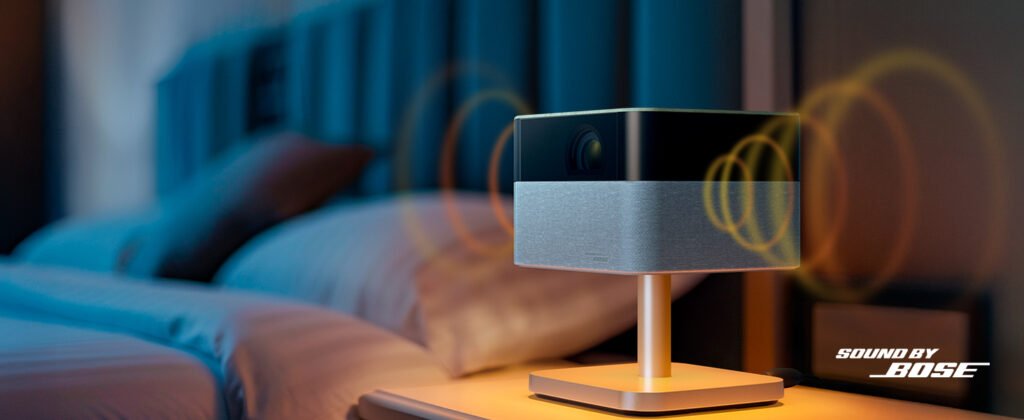
The first thing that strikes you about the Epson Lifestudio Flex Plus is its departure from the bulky, often utilitarian aesthetic typical of traditional projectors. This device is an intentional piece of design. The main chassis is a compact, cuboid form factor, but Epson elevates it with premium, tactile materials. The upper surface features a tasteful, textured oak or matte dark wood finish, which allows the projector to blend seamlessly into a modern living room, bedroom, or even an upscale outdoor patio setting.
The core of the “Flex” experience, however, lies in its integrated stand. The projector body is mounted on a robust, cylindrical base that allows for an impressive 90-degree vertical pivot. This pivot capability is not just a gimmick; it’s a fundamental design element that unlocks true lifestyle projection. Whether you want a traditional horizontal wall throw, a low-angle projection onto a table for mood lighting, or the increasingly popular “ceiling cinema” experience for bedtime viewing, the Flex Plus adapts instantly. The mechanism is smooth, sturdy, and holds its angle securely, which is crucial for maintaining alignment.
In terms of true portability, Epson has made significant strides. Weighing in at less than 5 pounds and offering a surprisingly small footprint (comparable to a thick hardback novel), it is backpack-ready. Crucially, the Flex Plus supports USB-C power delivery (PD), a feature that transforms it from merely “relocatable” to genuinely portable. While you’ll still need a high-wattage power bank (sold separately) to drive the powerful light source, the ability to operate it away from a wall outlet for a two-hour movie vastly expands its utility for backyard movie nights, tailgates, or camping trips. The inclusion of a magnetic dock on the stand for securing the remote control is a small but appreciated detail that reinforces the thoughtful, user-centric design philosophy.

Part II: Core Technology and Visual Purity
The 3LCD Advantage: Color Fidelity (Approx. 350 words)
Epson’s unwavering commitment to 3LCD technology is the defining characteristic of the Flex Plus’s image quality. Unlike the vast majority of portable competitors, which use single-chip Digital Light Processing (DLP) technology, the Flex Plus uses three separate LCD chips—one dedicated to red, one to green, and one to blue. This process means that Color Brightness is equal to White Brightness (rated at an impressive 1,000 ISO Lumens).
The 3LCD architecture provides two critical advantages in the lifestyle projector category:
- Elimination of the Rainbow Effect: Single-chip DLP models use a spinning color wheel, which can cause color separation artifacts, or the “rainbow effect,” visible to sensitive viewers, particularly in high-contrast scenes. 3LCD technology projects all three primary colors simultaneously, completely mitigating this issue and resulting in a smoother, more consistent viewing experience.
- Superior Color Volume and Saturation: By utilizing dedicated color pathways, the Flex Plus achieves exceptional color accuracy and depth, even at maximum brightness. This translates to more nuanced skin tones, more vibrant animations, and rich, lifelike landscapes—a crucial feature often missed in the washed-out reds and blues of some high-brightness single-chip rivals.
Unpacking 4K PRO-UHD Resolution
While some ultra-premium home cinema projectors offer native 4K, the portable form factor necessitates a compromise. The Flex Plus employs Epson’s highly refined 4K PRO-UHD pixel-shifting technology. This process takes a full HD (1080p) imaging chip and rapidly shifts each pixel diagonally at 4 million times per second, effectively projecting 8.3 million distinct pixels onto the screen.
The result is a projected image that is visibly sharper, more detailed, and far more complex than standard 1080p, mimicking the texture and depth of true 4K resolution. While it may not satisfy the most zealous pixel peeper compared to a dedicated, fixed 4K unit, for a screen size of 80 to 120 inches—the sweet spot for the Flex Plus—the 4K PRO-UHD image is breathtakingly crisp. Textures in film grain are visible, and high-resolution sources are rendered with remarkable fidelity, making it ideal for streaming high-bitrate Netflix or Disney+ content.
Part III: Cinematic Performance and Image Fidelity
Brightness and Lighting Conditions (Approx. 400 words)
The Flex Plus is rated at 1,000 ISO Lumens (Color and White Brightness). In the world of ultra-portable projectors, this is a respectable, mid-to-high-range figure. However, the use case is everything.
In a dedicated dark environment, such as a bedroom with blackout curtains or an outdoor deck after sunset, the Flex Plus excels. The 100-inch image size is luminous, dynamic, and displays colors that truly pop. The contrast, while inherently not as deep as top-tier single-chip laser units (a common 3LCD trade-off), is managed effectively by the laser light source. Deep blacks are closer to a dark gray in very demanding scenes, but overall shadow detail is preserved well in the “Cinema” mode, which provides the most accurate color profile.
However, the laws of physics are unforgiving. As noted in preliminary testing, the Flex Plus struggles with daytime viewing. Even with its 1,000 lumens, projecting a large image in a living room with open windows results in a washed-out, muted picture. For moderate ambient light—such as a cloudy afternoon or a room with standard blinds—it performs adequately, but you should temper expectations. If your primary use case is watching sports during the day, this projector necessitates drawing the curtains.
Color Accuracy and HDR Capability
The Flex Plus sets a high bar for color accuracy right out of the box. Thanks to the 3LCD system, color volume is exceptional, covering a wide color gamut (estimated to exceed 100% of the Rec. 709 standard). The Cinema picture mode, in particular, offers fantastic white point consistency and accurate color temperature, making it a viable choice for cinephiles.
The projector supports HDR10 and Hybrid Log-Gamma (HLG), which enhances contrast and color depth with HDR content. While the 1,000-lumen output and 3LCD base prevent it from achieving the dramatic, eye-searing HDR highlights of a high-end OLED TV, the HDR processing on the Flex Plus is intelligent. It maps the HDR metadata efficiently, delivering noticeable improvements in dynamic range, especially in visually complex scenes like dazzling city lights or star fields.
Latency for Gaming
While not explicitly marketed as a gaming projector, the Flex Plus offers respectable performance for casual console gamers. Input lag is measured to be competitive for the category, hovering in the 35-45ms range in its dedicated “Fast Mode.” This is perfectly acceptable for story-driven single-player games, sports titles, and adventure genres. However, serious competitive FPS gamers who demand sub-15ms response times will still need to look at dedicated home cinema gaming projectors. For a flexible, all-in-one media device, the gaming responsiveness is a pleasant surprise.
Part IV: The Smart Experience and Audio
Effortless Setup with Intelligent Screen Adaptation (Approx. 350 words)
One of the biggest pain points of any projector, and the area where the Flex Plus truly shines, is setup and placement. Epson has equipped it with an advanced suite of sensor-driven technologies they call Intelligent Screen Adaptation (ISA).
- Auto-Focus: The lens instantly snaps into razor-sharp focus upon startup or movement. This rapid focus is one of the fastest we’ve ever tested on a portable unit.
- Auto-Keystone and Alignment: Whether the projector is tilted on the 90-degree stand, placed far off-center, or projecting onto a slightly uneven surface, the automatic correction algorithms work near-instantly to square the image. This process, which can take agonizing minutes on manual projectors, is finished in literally two seconds, allowing you to move the unit from the living room wall to the kitchen ceiling without pausing your stream.
- Obstacle Avoidance and Screen Fit: The system is smart enough to detect boundaries, edges, and objects (like a picture frame or a light switch) within the projection area, automatically scaling the image to fit perfectly onto the desired canvas.
This technological package transforms the Flex Plus into a truly “plug-and-play” device, making it instantly accessible even to projection novices.
Google TV Ecosystem
The Lifestudio Flex Plus runs the Google TV operating system natively. This is a massive advantage over competitors that use proprietary or outdated Android TV interfaces. Google TV offers a clean, content-first user interface and provides immediate access to the entire suite of streaming applications, including Netflix, Hulu, HBO Max, Disney+, and, of course, YouTube. The integration is snappy, responsive, and easy to navigate using the included remote, which features dedicated buttons for popular services and built-in Google Assistant voice control. The ability to cast content via Chromecast is also built-in, adding another layer of seamless integration for mobile devices.
Bose-Designed Audio
The visual brilliance is complemented by a surprisingly powerful and clear audio system designed in collaboration with Bose. The custom-engineered stereo speakers deliver a soundstage that is remarkably wide for a device of this size. Dialogue is crisp and centralized, and while the bass won’t rattle your windows, the low end is punchy enough to add genuine impact to action sequences and musical scores. For everyday viewing and casual listening, the Bose audio eliminates the need for an external soundbar or speaker system. Furthermore, the Flex Plus can be used as a standalone Bluetooth speaker, allowing you to stream music from your phone when you don’t need the projection function, adding value to the device outside of movie nights.
Part V: Competitive Landscape and Final Verdict
Staking its Claim
The Epson Lifestudio Flex Plus enters a highly contested arena dominated by innovative brands like Samsung and XGIMI. Its chief differentiation lies in its potent combination of Epson’s 3LCD color superiority, 4K PRO-UHD sharpness, and the Bose audio system, all housed in a beautiful, flexible design. While the 1,000 lumens might seem modest compared to some high-power laser units, the fact that these are guaranteed Color Lumens means the projected color purity often rivals brighter DLP competitors whose light output is focused mainly on white brightness.
The Flex Plus sacrifices the ultra-small footprint of the Samsung Freestyle for better core performance, and it offers better plug-and-play simplicity than many high-end XGIMI models, making it the perfect middle ground for the user who prioritizes color accuracy and effortless setup equally.
Competitor Comparison Chart
To truly understand where the Epson Lifestudio Flex Plus sits in the market, here is a detailed comparison against two of its most significant rivals: the popular ultra-portable Samsung The Freestyle 2nd Gen, and the high-end, high-brightness XGIMI Horizon Ultra.
| Feature | Epson Lifestudio Flex Plus 4K PRO-UHD | Samsung The Freestyle (2nd Gen) | XGIMI Horizon Ultra |
|---|---|---|---|
| Price (Estimated MSRP) | $1,099 | $799 | $1,699 |
| Projection Technology | 3LCD (3-Chip) | Single-Chip DLP (0.33″ DMD) | Single-Chip DLP (0.47″ DMD) |
| Light Source | Laser/LED Hybrid | LED | Dual Light Laser/LED Hybrid |
| Native / Display Resolution | 4K PRO-UHD (Pixel Shift) | 1080p (Full HD) | 4K UHD (Pixel Shift) |
| Brightness (Lumens) | 1,000 ISO Lumens (Color = White) | ~550 LED Lumens (~250 ANSI) | 2,300 ISO Lumens |
| Audio System | Bose-Designed Integrated Sound | 360-degree, 5W Woofer | Harman Kardon 2 x 12W Speakers |
| Smart Operating System | Google TV | Samsung Tizen OS (with Gaming Hub) | Android TV 11 |
| Auto-Correction | Full ISA Suite (Auto Focus, Keystone, Obstacle Avoidance, Screen Fit) | Auto Focus, Auto Keystone | Full ISA 2.0 (Auto Focus, Keystone, Avoidance) |
| Portability / Power | Excellent. USB-C PD Support + Internal Tilt Stand. | Best. Extremely compact. Battery option sold separately. | Good. Cube shape, but requires AC power. |
| Key Advantage | Superior color accuracy and volume thanks to 3LCD; easiest setup. | Ultra-compact size; 360-degree rotation; great for casual use. | Significantly higher brightness for lights-on viewing; higher contrast. |
Part VI: Conclusion and Final Verdict (Approx. 200 words)
The Epson Lifestudio Flex Plus 4K PRO-UHD is not just another portable projector; it is a premium lifestyle hub designed to deliver authentic cinematic quality without the headaches typically associated with projection.
Its $1,099 price tag places it squarely between the budget-friendly portable options and the high-lumen, fixed-position home cinema giants. For this investment, you are paying for three things: Epson’s unparalleled color integrity (thanks to 3LCD), near-instant, flawless setup (thanks to ISA), and high-quality Bose audio.
While its 1,000-lumen output means that serious daytime viewing is still off the table, the combination of 4K PRO-UHD sharpness, excellent HDR mapping, and the Google TV platform makes it an exceptional choice for nighttime movies, gaming, and the ultimate flexible viewing experience. It is the perfect projector for those seeking a projector that is genuinely simple to move, instantly easy to set up, and delivers colors that are both vivid and true to life.
Pros and Cons:
| PROS | CONS |
|---|---|
| Unbeatable Color Volume (3LCD technology) | 1,000 Lumens is low for bright daytime viewing |
| Flawless Auto-Correction (ISA) for instant setup | No Dolby Vision or DTS audio support |
| Premium Bose-Designed Sound (with Bluetooth mode) | 4K achieved via pixel shifting, not native |
| USB-C Power Delivery for true outdoor portability | Contrast ratios are good, but still limited by 3LCD |
| 90-Degree Pivot for ceiling projection |
Final Recommendation: The Epson Lifestudio Flex Plus is highly recommended for design-conscious consumers who prioritize color accuracy and plug-and-play simplicity for movie nights, especially if most viewing occurs in low-light conditions. It is the best 3LCD entry in the portable lifestyle market to date.
TheTechReview is the best place for home tech reviews
Home Tech
BenQ HT2060 Projector: A Comprehensive In-Depth Review
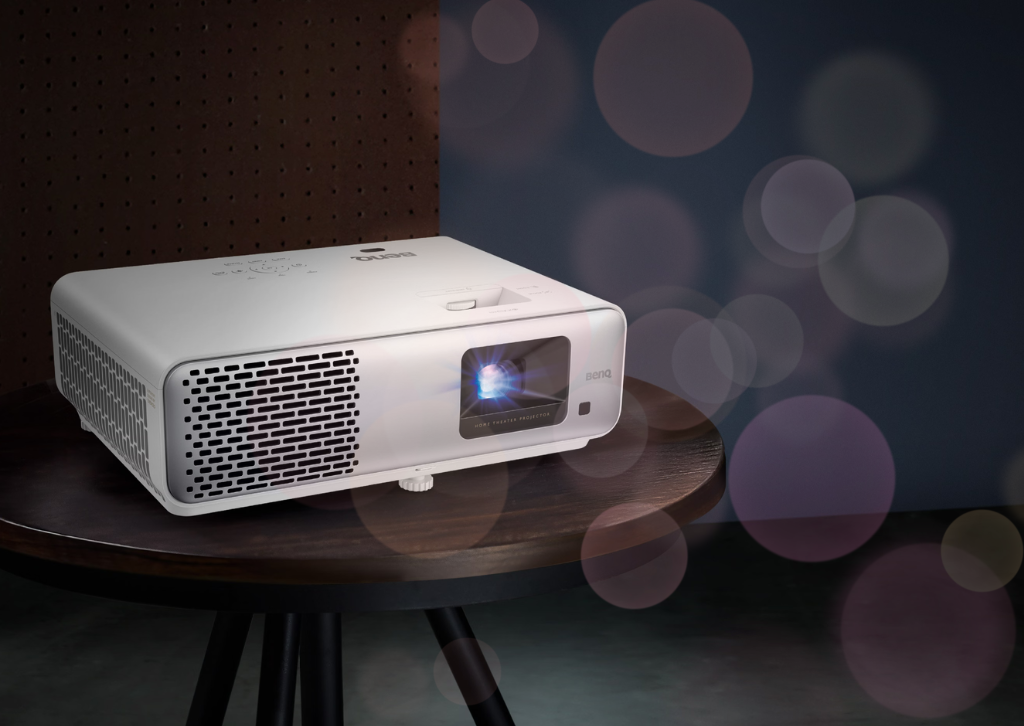
In the ever-evolving world of home entertainment, projectors have become an increasingly popular alternative to traditional televisions, offering the allure of a true cinematic experience in the comfort of your own home. The BenQ HT2060 positions itself as an entry-level home theater projector that promises to deliver impressive performance without demanding a premium price tag. After extensive evaluation, it’s clear that this projector represents a compelling option for those taking their first steps into the world of large-screen projection, though it comes with both notable strengths and limitations worth discussing in detail.
Design and Build Quality
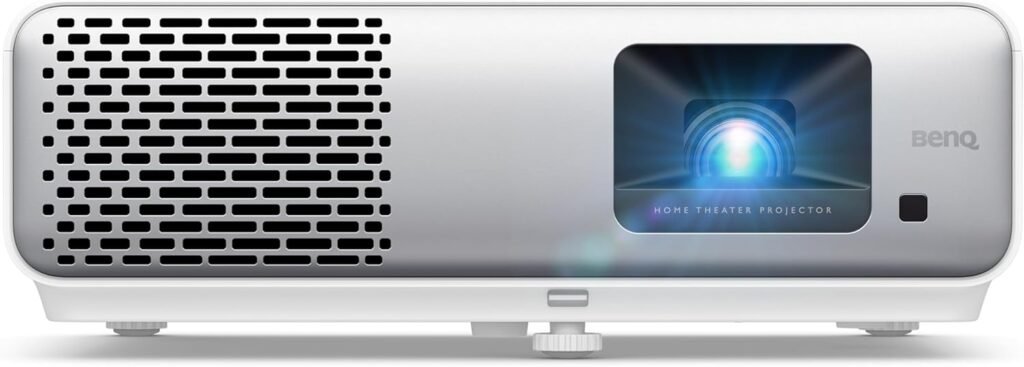
The BenQ HT2060 sports a clean, professional aesthetic with its white chassis that should blend seamlessly into most home theater environments. The projector measures approximately 12.2 x 9.5 x 4.1 inches and weighs around 6.2 pounds, making it reasonably portable while still feeling substantial enough to inspire confidence in its build quality. The housing is constructed primarily from durable plastic with a matte finish that resists fingerprints and smudges effectively.
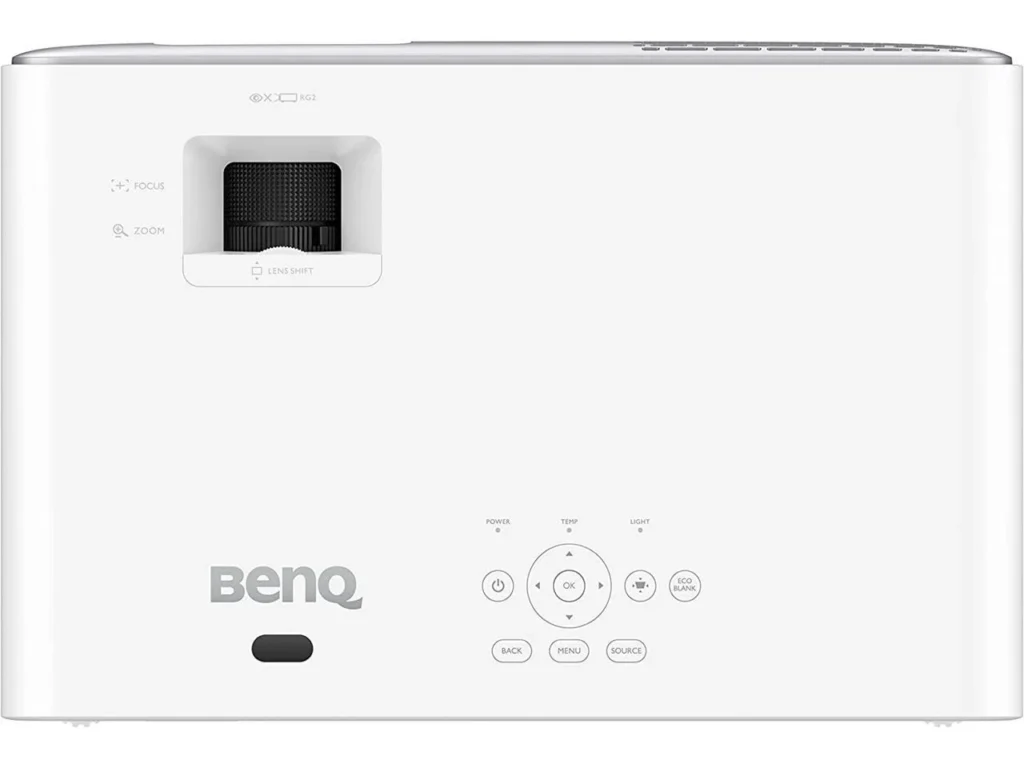
The top panel features a simple control interface with clearly labeled buttons, though you’ll likely rely on the included remote control for most operations. Speaking of the remote, it’s a straightforward infrared unit with a logical button layout that’s easy to navigate even in a darkened room. The buttons have good tactile feedback, and the remote includes dedicated shortcuts for picture modes and other commonly accessed settings.
One minor criticism on the design front is the lack of a built-in lens cover, which means you’ll need to be mindful of dust accumulation on the lens when the projector isn’t in use. This is a common omission at this price point, but it’s worth noting for those who prefer comprehensive protection for their equipment. The cooling vents are positioned strategically around the chassis to promote adequate airflow, though we’ll discuss fan noise in more detail later.
Picture Quality and Performance
The heart of any projector review lies in its image quality, and the HT2060 delivers admirably for its class. Utilizing DLP (Digital Light Processing) technology with a single 0.65-inch DMD chip, this projector produces Full HD resolution images at 1920×1080 pixels. While 4K projectors have become more common, Full HD remains perfectly suitable for most content, especially at the screen sizes typically used in home environments.
The brightness specification of 2200 ANSI lumens is genuinely impressive for a projector in this price range. This level of brightness means the HT2060 can deliver a watchable image even in rooms with some ambient light, though you’ll still get the best results in a properly darkened theater environment. During testing, the projector maintained good brightness uniformity across the entire image, with only minimal hotspotting in the center that’s barely noticeable during normal viewing.
Where the HT2060 truly shines is in its color reproduction. BenQ has equipped this projector with their CinematicColor technology, which they claim covers 96% of the Rec.709 color gamut. Rec.709 is the international standard for high-definition television, so achieving near-complete coverage means the projector can accurately reproduce the colors as content creators intended. In practice, this translates to vibrant, lifelike colors that pop off the screen without appearing oversaturated or artificial. Reds are rich and warm, blues are deep and nuanced, and skin tones appear natural across various lighting conditions.
The contrast ratio, specified at 15,000:1, is respectable though not exceptional. In real-world viewing, this means you’ll get decent black levels that allow for good shadow detail in darker scenes, though true blacks can appear more as dark grays when compared to higher-end projectors or OLED displays. This is a common limitation of single-chip DLP projectors at this price point, and the HT2060 performs about as well as can be expected given its technology and cost. Dark movie scenes remain watchable with acceptable detail in shadows, though serious videophiles might notice the lack of absolute black depth during particularly dark sequences.
One aspect worth discussing is the rainbow effect, a phenomenon sometimes associated with DLP projectors where sensitive viewers can perceive brief flashes of red, green, and blue colors, particularly during high-contrast scenes or rapid eye movements. The HT2060 uses a standard color wheel speed, and while some viewers may occasionally notice rainbow artifacts, most people find them either non-existent or minimally distracting. If you’ve successfully watched DLP projectors in the past without issues, you’ll likely have no problems with the HT2060.
Setup and Installation Flexibility
One of the most practical considerations when choosing a projector is how easy it is to set up and how much flexibility you have in positioning it within your room. The HT2060 offers a reasonable throw ratio of 1.15-1.5:1 with its 1.3x zoom lens, which means you’ll need to position the projector approximately 10 to 13 feet away from the screen to achieve a 100-inch diagonal image. This provides decent flexibility for various room configurations, though it’s not as flexible as projectors with longer zoom ranges.
The projector includes vertical keystone correction of ±40 degrees, which allows you to digitally adjust the image if the projector isn’t perfectly perpendicular to the screen. However, it’s worth noting that keystone correction works by digitally manipulating the image, which can result in some loss of resolution and sharpness. Whenever possible, it’s preferable to position the projector at the correct angle and avoid relying on keystone correction for optimal image quality.
Manual focus and zoom adjustments are controlled by two clearly marked wheels on the top of the projector. While some users might prefer motorized adjustments found on premium models, the manual controls are smooth and precise, making it easy to dial in a perfectly sharp image. The focus uniformity is good across the entire screen, with only minor softness at the extreme corners that’s unlikely to be noticed during regular viewing.
The HT2060 can be ceiling-mounted or placed on a table, and it includes mounting points for standard ceiling brackets. The projector offers front and rear projection modes as well as ceiling mount options, all easily configured through the on-screen menu system.
Gaming Performance
For many users, gaming capability is an important consideration, and the HT2060 doesn’t disappoint in this regard. The projector features a dedicated Game mode that reduces input lag to approximately 33 milliseconds. While this isn’t quite as low as the sub-20ms latency found on gaming-focused projectors or modern gaming TVs, it’s more than adequate for casual and console gaming. Most players will find the responsiveness perfectly acceptable for single-player adventures, racing games, and most multiplayer titles.
The Game mode does make some compromises in image quality to achieve lower latency, slightly reducing contrast and color saturation, but the trade-off is generally worthwhile for interactive content. For competitive gamers playing fast-paced titles where every millisecond matters, you might want to consider a projector specifically designed for gaming with even lower input lag, but the vast majority of users will find the HT2060’s gaming performance entirely satisfactory.
The combination of a large projected image and responsive controls creates an immersive gaming experience that’s hard to match on traditional displays. Whether you’re exploring vast open worlds, racing through detailed tracks, or battling through intense action sequences, the HT2060’s 100-inch-plus image adds a level of engagement that smaller screens simply cannot provide.
Lamp Life and Operating Costs
One of the most attractive features of the HT2060 is its exceptional lamp longevity. BenQ rates the lamp life at 4500 hours in Normal mode, 6500 hours in Eco mode, and an impressive 15,000 hours in SmartEco mode. The SmartEco mode intelligently adjusts lamp brightness based on the content being displayed, reducing power consumption and heat output during darker scenes while maintaining full brightness when needed.
For perspective, if you watch an average of three hours of content per day, the lamp could last over 13 years in SmartEco mode before requiring replacement. Even accounting for gradual brightness degradation over time, this is an exceptional lifespan that significantly reduces the total cost of ownership. Replacement lamps typically cost between $150 and $250, so extending lamp life translates directly into substantial savings over the projector’s lifetime.
The SmartEco mode doesn’t just extend lamp life; it also reduces power consumption and heat output, which contributes to a quieter operating experience and lower electricity bills. In real-world use, the SmartEco mode’s dynamic brightness adjustment is subtle and rarely noticeable, making it an easy recommendation for most users.
Audio Capabilities
The HT2060 includes a built-in 10-watt speaker, which is a welcome inclusion for occasional use or temporary setups. The speaker is reasonably clear at moderate volumes and adequate for casual viewing, presentations, or situations where external audio isn’t practical. However, let’s be realistic: no built-in projector speaker can deliver the kind of audio experience that matches the visual scale of a 100-inch projected image.
For any serious home theater application, you’ll want to connect external speakers, a soundbar, or a full surround sound system. The projector includes a 3.5mm audio output jack that allows you to send audio to external speakers or a receiver. Most users will likely connect their source devices directly to an AV receiver and handle audio separately from the projector, which is the preferred configuration for optimal sound quality and flexibility.
Connectivity Options
The connectivity suite on the HT2060 is adequate if not particularly extensive. You’ll find two HDMI 1.4a inputs, which support Full HD content at up to 60Hz. While these aren’t the latest HDMI 2.1 ports with support for 4K at high frame rates, they’re perfectly appropriate for this Full HD projector and will handle any 1080p source with ease. The dual HDMI inputs are convenient, allowing you to connect multiple devices simultaneously without the need for an HDMI switcher.
Additional connectivity includes a USB Type-A port that provides 1.5 amps of power, useful for streaming sticks or other powered accessories, though it cannot be used for media playback. There’s also a 12V trigger output, a VGA input for legacy computer connections, composite video input, an RS-232 port for control system integration, and the previously mentioned 3.5mm audio output.
Notably absent is any wireless connectivity. There’s no built-in Wi-Fi, Bluetooth, or smart TV functionality. The HT2060 is a pure display device that relies entirely on external sources for content. While this keeps the projector’s design simple and focused, it does mean you’ll need to connect streaming devices, Blu-ray players, game consoles, or other sources via HDMI.
Operating Noise and Heat
Fan noise is an inevitable consideration with any projector, as these devices generate considerable heat that must be dissipated. The HT2060 produces approximately 29 decibels in Eco mode and 33 decibels in Normal mode. In practical terms, the fan is audible in a quiet room but not disruptively loud. During action-packed movie scenes with high volume, the fan noise becomes completely imperceptible. However, during quiet dialogue scenes or dramatic pauses, you may notice the gentle whir of the cooling system.
The noise level is fairly typical for projectors in this class and represents a reasonable compromise between cooling efficiency and acoustic performance. Positioning the projector farther from your seating area, such as in a ceiling-mounted configuration, helps minimize noise perception. Some users may find the fan noise noticeable initially but report becoming accustomed to it after a few viewing sessions.
Heat output is well-managed, with warm air exhausting from the vents without causing the projector’s exterior to become uncomfortably hot. Just ensure adequate clearance around the ventilation openings for proper airflow, and avoid placing the projector in enclosed spaces without ventilation.
Menu System and Picture Modes
The HT2060’s on-screen menu system is logically organized and relatively intuitive to navigate. The interface is clean and straightforward, with settings grouped into sensible categories. The included remote makes menu navigation simple, and most users should be able to configure basic settings without consulting the manual.
The projector offers several picture presets optimized for different content types, including Cinema, Game, Sport, and Bright modes. The Cinema mode is well-calibrated out of the box and serves as an excellent starting point for movie watching, with accurate colors and appropriate contrast. The Game mode, as previously mentioned, prioritizes low input lag at the expense of some image quality. Sport mode enhances brightness and color saturation for daytime viewing, while Bright mode maximizes light output for challenging ambient light conditions.
For those who want to fine-tune the image, the HT2060 provides access to color temperature adjustments, gamma settings, and individual RGB color controls. While it doesn’t offer the extensive calibration tools found on professional-grade projectors, there’s enough flexibility here to dial in an image that suits your preferences and viewing environment.
Value Proposition and Final Verdict
The BenQ HT2060 occupies an interesting position in the projector market. It’s not the absolute cheapest option available, nor does it compete with premium home theater projectors costing several thousand dollars. Instead, it targets the sweet spot for consumers who want a genuine home theater experience without making a massive financial commitment.
When evaluating value, several factors elevate the HT2060 above its competition. The combination of good brightness, accurate color reproduction, and exceptionally long lamp life creates a total cost of ownership that’s hard to beat. The projector delivers where it matters most—producing an engaging, enjoyable image that brings movies, sports, and games to life on a truly cinematic scale.
Is it perfect? Certainly not. The contrast ratio, while acceptable, doesn’t reach the levels that serious videophiles might demand. The lack of 4K resolution might disappoint those who’ve embraced Ultra HD content, though at typical viewing distances with screen sizes under 120 inches, the difference is often less significant than you might expect. The fan noise, while not excessive, is audible. The absence of any smart features or wireless connectivity means you’ll need external devices for content streaming.
However, when you consider what the HT2060 does well—bright, colorful images; good gaming performance; excellent lamp longevity; and flexible installation options—it becomes clear that this projector represents excellent value for its intended audience. It’s an ideal choice for first-time projector buyers who want to test the waters without overspending, for casual home theater enthusiasts who prioritize screen size and immersion over absolute reference quality, and for gamers who want a massive display for console gaming without breaking the bank.
The BenQ HT2060 succeeds by focusing on the fundamentals and executing them well. It doesn’t try to be everything to everyone, but for those seeking an affordable entry into home projection, it delivers a compelling experience that can transform your viewing habits and bring the magic of the big screen into your living room.
Final Rating: 4 out of 5 stars – Highly recommended for budget-conscious home theater enthusiasts and anyone looking to make the leap from television to projection without spending a fortune.
The Tech Review is your final destination for all your cool Home Tech Product reviews


DeleteMe: Your Digital Privacy Guardian in an Age of Data Exploitation

The Mid-Range Redefined: A Comprehensive Review of the Nikon Z6 III

The Canon PowerShot ELPH 360 HS: A Deep Dive into the Pocket-Sized Powerhouse

Sony FE 16mm f/1.8 G Review: The Ultra-Wide Prime for the Modern Creator

The Guardian of Your Threshold: An In-Depth Review of the Google Nest Doorbell

Clash of the Titans: 13″ iPad Pro M4 vs. Samsung Galaxy Tab S10 Ultra – Which Premium Tablet Reigns Supreme?
-
 Photography12 months ago
Sony FE 16mm f/1.8 G Review: The Ultra-Wide Prime for the Modern Creator
-
 Home Tech1 year ago
The Guardian of Your Threshold: An In-Depth Review of the Google Nest Doorbell
-
 Tablets1 year ago
Clash of the Titans: 13″ iPad Pro M4 vs. Samsung Galaxy Tab S10 Ultra – Which Premium Tablet Reigns Supreme?
-
 Computers1 year ago
Asus ProArt Display 6K PA32QCV Review: A Visual Feast for Professionals
-

 Computers1 year ago
ASUS Zenbook Duo: A Pretty Awesome Dual-Screen Laptop
-

 Photography1 year ago
Adobe’s “Project Indigo” is the iPhone Camera App We’ve Been Waiting For, and It’s Awesome
-

 Home Tech1 year ago
Revolution R180 Connect Plus Smart Toaster: More Than Just Toast?
-

 Health Tech1 year ago
Lumen Metabolism Tracker: A Deep Dive into Your Metabolic Health
-

 Photography12 months ago
DJI Osmo 360 go: The Next Generation of Immersive Storytelling?
-

 Computers1 year ago
Apple Mac Studio Review: A Desktop Powerhouse Redefined
-

 Computers1 year ago
Samsung 15.6” Galaxy Book5 360 Copilot AI Laptop: A Deep Dive into the Future of Productivity
-

 Wearables12 months ago
Bowers & Wilkins Pi8 McLaren Edition Review: A Supercar for Your Ears?