
Apps
What is Vibe Coding? A New Era in Software Development

Vibe Coding
Coined by AI researcher Andrej Karpathy, vibe coding is an emerging software development practice that uses artificial intelligence (AI) to generate functional code from natural language prompts. Instead of meticulously writing code line-by-line, a developer’s primary role shifts to guiding an AI assistant to generate, refine, and debug an application through a conversational process. The core idea is to focus on the desired outcome and let the AI handle the rote tasks of writing the code itself.
Who is it for?
Vibe coding is not just for professional developers. It’s designed to make app building more accessible to those with limited programming experience, enabling even non-coders to create functional software. For professional developers, it acts as a powerful collaborator or “pair programmer,” accelerating development by automating boilerplate and routine coding tasks. This allows experienced developers to focus on higher-level system design, architecture, and code quality.
What can you do with it?
The applications of vibe coding are vast, especially for rapid ideation and prototyping. It’s well-suited for:
- Prototyping and MVPs (Minimum Viable Products): Quickly create a functional prototype to test an idea without spending a lot of time on manual coding.
- Side Projects: Build small, personal tools or applications for specific needs.
- Data Scripts and Automation: Automate repetitive tasks or create small data processing scripts.
- UI/UX Mockups: Generate a visually functional user interface based on a description.
- Learning and Experimentation: Use AI tools to learn new programming languages or frameworks by asking them to explain the code they generate.
How to learn how to do it?
Learning vibe coding is less about mastering syntax and more about mastering communication with AI. Here are some key steps and best practices:
- Start with the right tools. Popular choices include GitHub Copilot, ChatGPT, Google Gemini, and platforms like Replit and Cursor.
- Be specific and break down complex tasks. The “garbage in, garbage out” principle applies. Instead of asking the AI to “build a social media app,” start with a specific, manageable task, like “create a Python function that reads a CSV file.”
- Iterate and refine. The first output may not be perfect. The process is a continuous loop of describing, generating, testing, and refining the code. You guide the AI with feedback like, “That works, but add error handling for when the file is not found.”
- Always review and verify. Do not blindly trust the AI’s output. Review the code it generates to ensure accuracy, security, and quality. A developer’s ability to read and debug code becomes an even more critical skill.
Is there a future job for it
Vibe coding is not seen as a replacement for human developers, but rather as an amplifier. The future of jobs in this space is likely to involve a shift in roles:
- AI-First Developer: A developer who builds products primarily using modern AI-powered tools.
- Prompt Engineer: A specialist who designs clear and effective prompts to get the best possible output from AI systems.
- Oversight Lead: A professional who validates, debugs, and secures AI-generated codebases.
Vibe coding will likely continue to evolve and create new opportunities for those who adapt and learn to work effectively with AI tools.
Q&A
Q: Can a non-coder truly build a full application with vibe coding?
A: While vibe coding can enable a non-coder to create a functional prototype or a simple app, complex, production-level applications with robust features and security still require the expertise of a professional developer to review, fix, and maintain the codebase.
Q: Does vibe coding make learning traditional programming languages obsolete?
A: No. While vibe coding automates much of the manual coding, a fundamental understanding of programming concepts, data structures, and algorithms is still essential for guiding the AI, debugging, and ensuring the quality and security of the final product.
Q: What are the main downsides of vibe coding?
A: Vibe coding can lead to technical complexity, a lack of architectural structure, and code quality issues. Debugging can be challenging, as the code is dynamically generated. There are also potential security risks if the generated code is not properly vetted.

Want to know if that new app is worth the download? Our in-depth reviews have you covered. We’ve tested the latest software so you can make smarter decisions.
Explore our app and software reviews now to upgrade your digital life!

Apps
DeleteMe: Your Digital Privacy Guardian in an Age of Data Exploitation
In an era where personal information has become currency, DeleteMe stands as one of the leading solutions for individuals seeking to reclaim control over their digital footprint. Operating since 2010, this subscription-based privacy service has carved out a reputation as a trusted ally in the fight against data brokers and unauthorized information sharing.
What Is DeleteMe?
DeleteMe is a subscription service designed to remove personal information being sold online, offered through the website joindeleteme.com. Founded in 2010 by Rob Shavell, the service was among the first data removal services to exist. Built and operated by Abine, Inc., DeleteMe has established itself as what many consider the gold standard in personal data removal services.
The service addresses a growing problem: data brokers—companies that collect, compile, and sell personal information to virtually anyone willing to pay. These profiles can include Social Security numbers, birthdays, past and recent addresses, phone numbers, and more. What makes data brokers particularly concerning is that they gather this information from multiple sources, including public records, social media platforms, and even other data brokers, creating comprehensive dossiers on individuals without their explicit consent.
How DeleteMe Works
Unlike many automated privacy services, DeleteMe’s process for finding and removing private data relies heavily on manual work by real people, ensuring a more thorough process. This human-assisted approach sets it apart from competitors that rely solely on automation.
The process begins simply. After subscribing, users fill out a data sheet specifying what personal information they want removed—names, addresses, phone numbers, email addresses, and other identifying details. Within seven days, subscribers receive a detailed report showing which data broker sites have their information.
From there, DeleteMe’s privacy advisors take over, submitting removal requests to the identified sites. The service performs opt-out processes from over 750 databases, one of the higher numbers in the industry. DeleteMe doesn’t stop after the initial removal either—it continues monitoring and removing information every three months throughout the subscription period to ensure data doesn’t reappear.
Coverage and Capabilities
DeleteMe targets major people-search databases and data broker sites, including well-known platforms like Whitepages, Spokeo, MyLife, PeopleFinder.com, and US Search. The service is available to customers in all 50 US states and internationally, including Australia, Belgium, Brazil, Canada, France, Germany, Ireland, Italy, the Netherlands, Singapore, and the United Kingdom.
It’s important to understand what DeleteMe can and cannot do. The service cannot delete Google search results directly without first removing the source information from data broker websites, as Google merely displays information from other sources. The strategy focuses on eliminating data at its source, which then causes it to disappear from search engine results over time.
Pricing and Plans
DeleteMe’s pricing structure offers several tiers to accommodate different needs. According to recent pricing information:
- Individual Plan (1 year): Starting at approximately $129 per year (about $10.75/month)
- Individual Plan (2 years): Around $167 for two years ($6.97/month), offering nearly 20% savings
- Couple Plan: Covers two people at approximately $229 per year ($19.08/month)
- Family Plan: Protects four people for around $329 per year ($27.42/month)
All plans are billed annually or biennially rather than monthly, and they include the same core features—the differences lie in the number of people covered and subscription duration. Business plans are also available with custom pricing for organizations needing executive-level protection.
DeleteMe doesn’t offer a traditional free trial, but it does provide a free privacy scan for U.S. residents to see what information data brokers have collected. Refund requests can be made before the first data privacy report is complete, or pro-rated refunds are available based on remaining subscription time.
Real-World Impact
The effectiveness of DeleteMe is reflected in both user testimonials and measurable results. The company claims over 100 million personal listings removed since 2010, establishing it as one of the most proven privacy solutions available.
Customer reviews consistently highlight several benefits. Many users report dramatic reductions in spam emails and robocalls shortly after subscribing. The service has earned recognition from major publications and maintains strong ratings—an A+ from the Better Business Bureau and predominantly positive reviews on platforms like Trustpilot.
Users particularly appreciate the “set it and forget it” nature of the service, with privacy advisors handling the tedious work of contacting data brokers and tracking removal progress. Regular updates keep subscribers informed about their privacy status without requiring active management on their part.
Who Needs DeleteMe?
DeleteMe serves various user profiles, each with unique privacy concerns:
- Identity theft victims seeking to limit their exposure after experiencing fraud
- Online daters who want to prevent strangers from easily accessing their home addresses
- Public figures and professionals concerned about safety and professional reputation
- Privacy-conscious individuals who simply want control over their personal information
- Parents looking to protect their families from data exploitation
The service has even received endorsements for workplace safety, with recommendations that organizations offer cybersecurity services like DeleteMe to employees facing online harassment.
Limitations to Consider
While DeleteMe offers robust protection, it’s not without limitations. Some data broker sites can be slow to process removal requests, and certain sites may require custom removal requests beyond the automatic coverage. The service operates within legal frameworks for data removal, which means it cannot remove all information from all sources—particularly information from social media platforms where users have voluntarily shared details, or from certain public records.
Additionally, data removal is an ongoing battle. Information can resurface as data brokers continuously scrape new sources, which is why DeleteMe’s quarterly monitoring is essential for maintaining privacy.
The Broader Privacy Picture
DeleteMe represents one tool in a comprehensive privacy strategy. While it excels at removing data from broker sites, users concerned about digital privacy should also consider other measures: using virtual private networks (VPNs), employing strong password managers, being cautious about information shared on social media, and regularly reviewing privacy settings across online accounts.
The existence of services like DeleteMe underscores a troubling reality: in the modern digital economy, personal information has become a commodity traded with minimal oversight in many jurisdictions. Many states have weak or nonexistent consumer data privacy laws, leaving individuals vulnerable to having their information collected, packaged, and sold without meaningful consent.
Is DeleteMe Worth It?
For individuals serious about protecting their online privacy, DeleteMe offers substantial value. The combination of comprehensive coverage, human-assisted removal, ongoing monitoring, and transparent reporting creates a powerful privacy protection package. While the service requires an annual investment, many users find the reduction in spam, increased security, and peace of mind well worth the cost.
The choice ultimately depends on personal priorities. Those who have experienced identity theft, face professional risks from exposed information, or simply value privacy in an increasingly surveilled world will likely find DeleteMe an essential service. For others who maintain minimal online presence or feel comfortable managing opt-outs manually, the investment may be less critical.
In a digital landscape where personal information flows freely and often without permission, DeleteMe offers individuals a fighting chance at controlling their own data narrative. As data brokers continue evolving their collection methods, having a dedicated service monitoring and removing personal information provides not just privacy protection, but genuine peace of mind in an age of digital overexposure.
We are the destination for all the best App and SAAS reviews
Apps
OpenAI Takes on Chrome: Inside the Launch of ChatGPT Atlas Browser

OpenAI has fired the opening shot in a new chapter of the browser wars. On October 21, 2025, the company unveiled ChatGPT Atlas, a web browser that doesn’t just display websites but actively understands and interacts with everything users see. Currently available only for macOS, Atlas represents OpenAI’s boldest move yet to challenge Google’s dominance in how people access and navigate the internet.
A Browser Built Around AI
What makes Atlas different from the dozens of browsers already competing for market share? The answer lies in its core design philosophy. Rather than bolting AI features onto an existing browser, OpenAI built Atlas from the ground up with ChatGPT as what the company calls “the beating heart” of the browsing experience.
When users open a new tab in Atlas, they’re presented with two options: enter a URL or ask ChatGPT a question directly. This fundamental design choice signals a dramatic shift in how we might interact with the web. Instead of typing search queries into a box and clicking through results, users can have conversational exchanges that blend traditional browsing with AI assistance.
The browser features a persistent ChatGPT sidebar that can analyze whatever page users are viewing. Need a summary of a lengthy article? Want an explanation of complex technical documentation? Looking for instant answers about the content on screen? The sidebar is always available, ready to help users make sense of the web.
Built on Chromium, the open-source engine that powers Google Chrome, Atlas supports familiar features like Chrome extensions, tabs, autofill, and the ability to import bookmarks and settings from existing browsers. This means users won’t have to abandon their favorite tools or start from scratch.
Memory That Connects Your Digital Life
One of Atlas’s most powerful and controversial features is its memory system. The browser can remember not just your searches and visited sites but can also access your entire ChatGPT conversation history to customize responses. This creates a seamless connection between your chatbot interactions and your browsing behavior.
The practical applications are compelling. Users can ask questions like “Find all the job postings I was looking at last week and create a summary of industry trends so I can prepare for interviews.” Atlas can pull together information scattered across tabs, browsing history, and previous conversations to deliver comprehensive answers.
However, OpenAI emphasizes that users maintain complete control over these memories. The feature is entirely optional and can be disabled. Users can view all stored memories in settings, archive those no longer relevant, and clear browsing history to delete associated memories. There’s also a toggle in the address bar to decide which sites ChatGPT can or cannot see. When visibility is turned off, ChatGPT can’t view page content and no memories are created.
For those seeking maximum privacy, Atlas includes an incognito mode where browsing isn’t linked to your ChatGPT account and isn’t saved in browser history.
Agent Mode: AI That Acts on Your Behalf
Perhaps the most ambitious feature in Atlas is Agent Mode, currently available in preview to Plus, Pro, and Business subscribers. This capability allows ChatGPT to perform tasks autonomously within the browser, opening tabs, clicking buttons, and navigating websites to complete complex workflows on the user’s behalf.
The use cases OpenAI highlights are surprisingly practical. Planning a dinner party? Give ChatGPT a recipe and ask it to find a grocery store, add all ingredients to a cart, and place an order. Need to research competitors? Ask it to open past team documents, perform new competitive research, and compile insights into a brief.
When users initiate a task, ChatGPT may ask permission to start opening tabs and clicking in the browser. It’s an early-stage experience that may struggle with complex workflows, but OpenAI promises rapid improvements in reliability and task success rates.
The company has implemented significant safeguards for Agent Mode. The AI cannot run code in the browser, download files, or install extensions. It cannot access other apps or the computer’s file system. On sensitive sites like financial institutions, it pauses to ensure users are actively watching its actions. OpenAI has clearly learned from the concerns raised about earlier autonomous AI systems and is proceeding cautiously.
Privacy and Security Concerns
The launch of Atlas has sparked legitimate questions about privacy and security. Allowing an AI system to watch and remember everything you do online represents a significant expansion of data collection, even if users technically remain in control.
OpenAI states that by default, browsing data isn’t used to train AI models. However, users can opt in to include web browsing data for training purposes. Even then, webpages that opt out via GPTBot won’t be trained on. The company has also extended its parental controls from ChatGPT to Atlas, with additional options for parents to disable browser memories and Agent Mode entirely.
Critics have pointed out similarities between Atlas and Perplexity’s Comet browser, which launched earlier this year with its own AI-powered features. Some users commenting on OpenAI’s launch video suggested that Atlas “just feels like it could be a Chrome plugin” and questioned whether the browser truly offers enough innovation to justify switching from established alternatives.
Security researchers have raised concerns about the vulnerabilities that come from giving an AI system such deep access to browsing behavior and logged-in accounts. During the livestream announcement, OpenAI’s Pranav Vishnu acknowledged these risks directly: “Despite all of the power and awesome capabilities that you get with sharing your browser with ChatGPT, that also poses an entirely new set of risks.”
The Strategic Stakes
For OpenAI, Atlas represents more than just a new product. With over 800 million ChatGPT users, the browser could provide a crucial revenue stream to help monetize that massive user base and offset the company’s substantial infrastructure costs. OpenAI has strategically hired former Chrome and Firefox developers, including Ben Goodger as Engineering Lead for Atlas, signaling serious long-term commitment to this market.
For Google, the threat is real but not immediate. Chrome’s dominance has been instrumental to Google’s online advertising empire, which generated $54 billion in the last quarter alone. Even a small slice of that market would be significant for OpenAI. When news of the Atlas launch broke, Alphabet’s stock initially dropped 4.8 percent, though it recovered as the actual features were revealed during the livestream.
Google hasn’t been standing still. The company has already integrated its Gemini AI into Chrome to add similar AI-powered features, positioning itself to defend its territory. The competition is intensifying, with multiple players now viewing AI-enhanced browsing as the next frontier.
The Future of Web Browsing
Atlas arrives at a pivotal moment. As OpenAI notes in its announcement, AI gives us “a rare moment to rethink what it means to use the web.” For decades, browsing has meant clicking links, typing URLs, and navigating through nested pages. Atlas suggests a future where conversational interaction becomes primary, and the browser doesn’t just respond to commands but anticipates needs and takes action.
Whether users will embrace this vision remains to be seen. The browser is currently limited to macOS, and many features are still in preview stages. Reliability issues with Agent Mode and legitimate privacy concerns may give potential switchers pause.
Yet the underlying premise is compelling: the web contains vast amounts of information, but finding, understanding, and acting on that information remains unnecessarily difficult. If Atlas can truly make browsing smarter, more intuitive, and more efficient while respecting user privacy, it could reshape how hundreds of millions of people interact with the internet.
The browser wars have been relatively quiet for years, with Chrome’s dominance going largely unchallenged. ChatGPT Atlas signals that the competition is heating up again, and this time, AI is the differentiating factor that could redraw the entire landscape.
TheTechReview.net is the best place for all your App reviews
Apps
Evernote v11: The Comeback Story Powered by AI
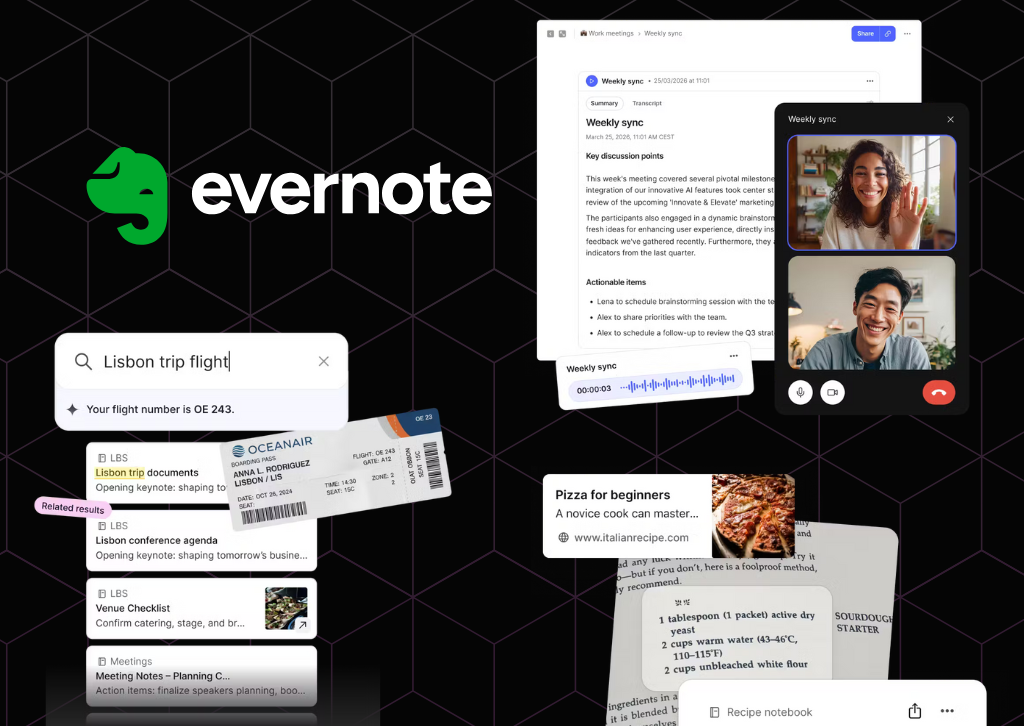
The note-taking pioneer reinvents itself with OpenAI partnership and long-awaited features
Evernote, the once-dominant note-taking app that seemed to fade into obscurity, is making a bold play for relevance with its most significant update in five years. Version 11, released today, represents a dramatic shift in strategy as the company goes all-in on artificial intelligence, partnering with OpenAI to transform how users interact with their notes.
The timing of this comeback attempt is notable for anyone who’s written off Evernote in recent years. The company has been quietly rebuilding since Milan-based developer Bending Spoons acquired the struggling app in 2022 and subsequently relocated operations to Europe after significant layoffs. Now, with over 200 improvements and a major version release, Evernote is ready to reclaim its place in the productivity conversation.
AI Assistant: ChatGPT Inside Your Notes
The centerpiece of version 11 is AI Assistant, developed in collaboration with OpenAI. This isn’t just another chatbot bolted onto an existing app—it’s a deeply integrated tool that fundamentally changes how users can work with their accumulated knowledge.
AI Assistant goes beyond simple search functionality. Users can ask questions about their notes in natural language, generate new content, and interact conversationally with their entire note library. During a demonstration, Evernote’s product lead Federico Simionato showed how AI Assistant could add specific details like flight numbers to travel notes, suggesting a future where the tool becomes a true digital assistant rather than just a search interface.
The implementation comes with important privacy safeguards. Users maintain granular control over which content AI Assistant can access, and Bending Spoons’ agreement with OpenAI explicitly prevents user data from being used to train models. Any information sent for processing is only retained for the duration needed to complete the request.
Interestingly, Bending Spoons is taking a more aggressive approach with AI Assistant than with previous AI features. The tool will be enabled by default for all paid users, a decision informed by earlier missteps. When the company released AI Search in 2023, they buried the activation deep in settings out of privacy concerns. Users found this approach too cumbersome, and with AI tools becoming mainstream, Evernote decided to make AI Assistant immediately accessible.
Semantic Search: A Decade in the Making
Perhaps even more significant than AI Assistant is the introduction of Semantic Search—a feature longtime Evernote users have requested for over a decade. Traditional keyword search requires users to remember exact words or phrases from their notes. Semantic Search understands context and meaning instead.
The practical implications are substantial. Type “Barcelona trip” into the search bar, and Evernote might surface notes about a journey to Girona, recognizing the geographical and contextual relationship even though Barcelona isn’t mentioned in the document. This contextual understanding transforms Evernote from a digital filing cabinet into something closer to a second brain that actually understands what you’re looking for.
According to Simionato, Semantic Search tops the list of most-requested features from the Evernote community. Its arrival in version 11 suggests Bending Spoons is listening to longtime users while simultaneously courting new ones with AI-powered capabilities.
Enhanced Transcription and Recording
Building on the AI Transcribe feature introduced in 2024, version 11 expands Evernote’s audio capabilities significantly. The app can now record and automatically transcribe both in-person meetings and online conversations, then generate summaries of what was discussed. The feature supports every language currently available in Evernote, making it useful for international teams and multilingual users.
Earlier this year, Evernote increased the file size limit for AI transcription to 100MB, accommodating hour-long meetings or lectures. The transcription engine uses advanced speech recognition designed to handle various accents and background noise, though optimal results still require relatively clear audio.
The Road Ahead
All new AI features will roll out first to desktop and web versions this month, with mobile support following later. Currently, these capabilities are exclusive to paid subscribers, though Bending Spoons plans to offer free users a trial period in the coming months.
There’s a caveat worth noting: price increases are on the horizon. Simionato acknowledged that the company will adjust pricing soon, partly because the gap between Personal and Professional tier offerings has narrowed considerably.
For Evernote, version 11 represents more than just a feature update—it’s an argument that the app deserves another look. Simionato’s hope is simple: that people will give Evernote a try and discover it’s no longer the slow, unreliable application many remember.
Whether this AI-powered transformation can truly resurrect Evernote’s fortunes remains to be seen. The productivity app landscape has grown crowded with formidable competitors like Notion, Obsidian, and Roam Research. But with OpenAI’s technology under the hood and long-requested features finally arriving, Evernote at least has a compelling story to tell.
The question now is whether anyone’s still listening.
TheTechReview.net is the best place for all your App reviews


DeleteMe: Your Digital Privacy Guardian in an Age of Data Exploitation

The Mid-Range Redefined: A Comprehensive Review of the Nikon Z6 III

The Canon PowerShot ELPH 360 HS: A Deep Dive into the Pocket-Sized Powerhouse

Sony FE 16mm f/1.8 G Review: The Ultra-Wide Prime for the Modern Creator

Clash of the Titans: 13″ iPad Pro M4 vs. Samsung Galaxy Tab S10 Ultra – Which Premium Tablet Reigns Supreme?

The Guardian of Your Threshold: An In-Depth Review of the Google Nest Doorbell
-
 Photography1 year ago
Sony FE 16mm f/1.8 G Review: The Ultra-Wide Prime for the Modern Creator
-
 Tablets1 year ago
Clash of the Titans: 13″ iPad Pro M4 vs. Samsung Galaxy Tab S10 Ultra – Which Premium Tablet Reigns Supreme?
-
 Home Tech1 year ago
The Guardian of Your Threshold: An In-Depth Review of the Google Nest Doorbell
-

 Computers1 year ago
Asus ProArt Display 6K PA32QCV Review: A Visual Feast for Professionals
-

 Computers1 year ago
ASUS Zenbook Duo: A Pretty Awesome Dual-Screen Laptop
-

 Photography1 year ago
Adobe’s “Project Indigo” is the iPhone Camera App We’ve Been Waiting For, and It’s Awesome
-

 Photography1 year ago
DJI Osmo 360 go: The Next Generation of Immersive Storytelling?
-

 Health Tech1 year ago
Lumen Metabolism Tracker: A Deep Dive into Your Metabolic Health
-

 Home Tech1 year ago
Revolution R180 Connect Plus Smart Toaster: More Than Just Toast?
-

 Computers1 year ago
Apple Mac Studio Review: A Desktop Powerhouse Redefined
-

 Wearables1 year ago
Bowers & Wilkins Pi8 McLaren Edition Review: A Supercar for Your Ears?
-

 Computers1 year ago
Samsung 15.6” Galaxy Book5 360 Copilot AI Laptop: A Deep Dive into the Future of Productivity