3-D Printers
AnkerMake M5C 3D Printer: The Speedy & Simple Powerhouse
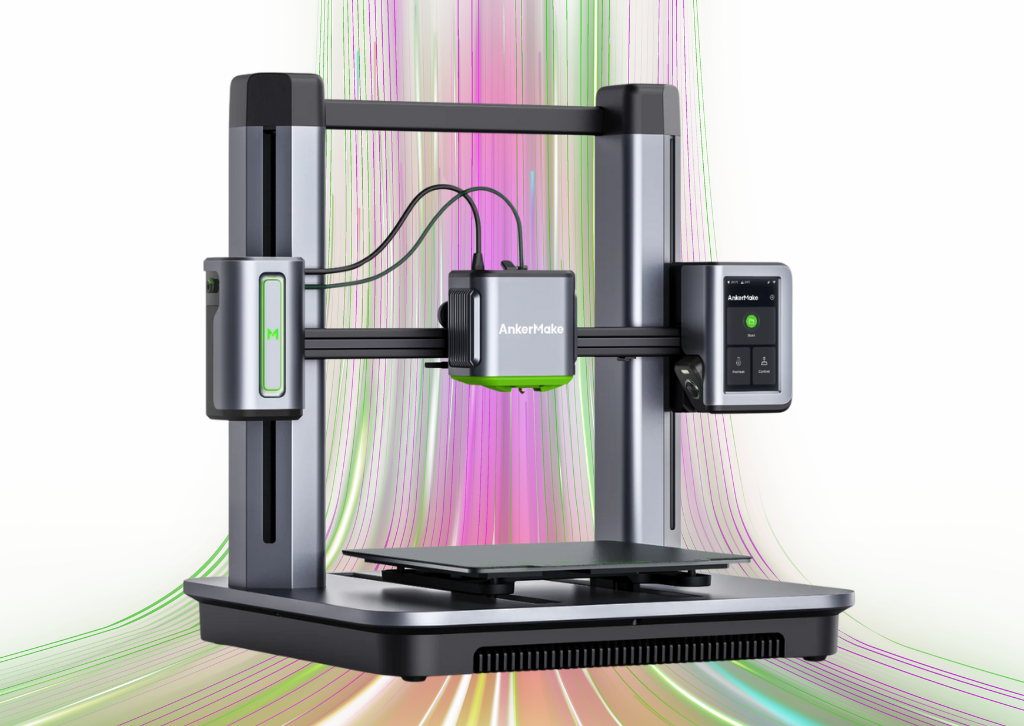
AnkerMake M5C 3D
For a long time, the world of 3D printing seemed to be a trade-off between speed, ease of use, and price. You could have two of the three, but never all. The AnkerMake M5C, however, challenges that notion. As a streamlined version of its larger sibling, the M5, the M5C arrives on the scene promising a new level of fast, reliable, and user-friendly printing at a price point that makes it accessible to a much wider audience. This review will dive into what makes this printer stand out and whether it’s the right choice for your next project.
Technical Specifications
| Feature | Specification |
|---|---|
| Print Technology | Fused Filament Fabrication (FFF) |
| Build Volume | 220×220×250 mm |
| Max Print Speed | 500 mm/s |
| Max Acceleration | 5000 mm/s2 |
| Nozzle Type | All-metal, 0.4 mm brass (interchangeable) |
| Max Nozzle Temp | $300^{\circ}$C |
| Max Bed Temp | $100^{\circ}$C |
| Filament Compatibility | PLA, PETG, TPU, ABS, PA, PLA-CF, PETG-CF, PA-CF |
| Bed Surface | PEI Soft Magnetic Plate |
| Connectivity | Wi-Fi, USB-C, Bluetooth |
| Weight | 9.6 kg |
Key Features
- Blazing Fast Printing: The M5C’s standout feature is its speed. With a maximum print speed of 500 mm/s and acceleration up to 5000 mm/s2, it can complete prints in a fraction of the time compared to traditional FDM printers, making it perfect for rapid prototyping and quick projects.
- One-Piece Aluminum Alloy Die-Casting: The printer’s body is a single, sturdy piece of aluminum. This design significantly reduces vibrations and flex during high-speed printing, ensuring superior print quality and stability.
- Automatic Bed Leveling: AnkerMake has implemented a reliable 49-point auto-leveling system that eliminates the need for tedious manual calibration. This feature, combined with a quick Z-offset calibration, ensures a perfect first layer every time.
- All-Metal Hotend: The M5C’s hotend can reach temperatures up to $300^{\circ}$C, which expands the range of compatible filaments. This allows users to experiment with more advanced materials like ABS and Nylon (though an enclosure is recommended for best results with these).
- Streamlined User Interface: Eschewing a built-in touchscreen, the M5C uses a single, customizable button and relies on the AnkerMake mobile and desktop app for all controls. This keeps the printer’s physical design simple and clean, with all management handled remotely.
Who It’s Best For
The AnkerMake M5C is an excellent choice for three groups of people:
- Hobbyists and Beginners: Its quick assembly (around 15 minutes), one-button operation, and automatic calibration make the M5C incredibly easy to get started with. You can spend more time designing and printing and less time tinkering.
- Those on a Budget: The M5C offers premium features like high-speed printing, a direct drive extruder, and a solid metal frame at a significantly lower price than many competitors.
- Engineers and Creators: The high speed is a game-changer for anyone who needs to quickly iterate on designs or produce functional prototypes.
Who May Not Like It
While the M5C is fantastic for many, it’s not a perfect fit for everyone.
- Users Who Prefer a Touchscreen: If you want to control your printer directly from the machine without a phone or computer, the M5C’s app-centric design may be a drawback.
- Those Who Need a Larger Build Volume: The 220×220×250 mm build area is standard, but those who frequently print very large models may find it limiting.
- Advanced Users Who Love to Tinker: The M5C is so well-integrated and user-friendly that it offers fewer options for deep-level customization and firmware tweaking than some other open-source printers.
Pros and Cons
| Pros | Cons |
|---|---|
| Extremely fast printing (up to 500 mm/s) | No built-in screen (app-dependent) |
| Quick 15-minute assembly | Smaller build volume than some competitors |
| Reliable auto-leveling | Lacks a built-in camera (available on M5) |
| Sturdy, die-cast aluminum frame | Less room for deep customization |
| All-metal hotend ($300^{\circ}$C) | Only one button on the printer |
| Affordable price point |
Competitor Comparison Chart
| Feature | AnkerMake M5C | Bambu Lab A1 Mini | Creality Ender-3 V3 KE |
|---|---|---|---|
| Price | ~$399 | ~$299 (+$150 for AMS) | ~$279 |
| Max Speed | 500 mm/s | 500 mm/s | 500 mm/s |
| Build Volume | 220×220×250 mm | 180×180×180 mm | 220×220×240 mm |
| Key Features | Unibody design, high-temp nozzle | Active noise cancellation, AMS for multi-color (optional) | Touchscreen, X-axis linear rail |
| Connectivity | Wi-Fi, Bluetooth, USB-C | Wi-Fi, MicroSD | Wi-Fi, LAN, USB |
| User Interface | App-based, single button | 2.4-inch IPS touchscreen | 4.3-inch color touchscreen |
Q&A
Q: Can I use third-party filaments? A: Yes, the M5C is compatible with any standard 1.75mm filament from any brand. Its $300^{\circ}$C hotend also allows for a wider range of materials.
Q: Is the printer loud when it’s printing fast? A: The high-speed printing does generate more noise, but AnkerMake has implemented features to minimize vibration. It’s generally comparable to other high-speed printers in its class.
Q: What slicer software can I use? A: You can use the dedicated AnkerMake Slicer, or you can use popular third-party options like PrusaSlicer and Ultimaker Cura.
Q: Do I need to buy an enclosure? A: For materials like PLA and PETG, an enclosure is not necessary. However, if you plan to print with filaments like ABS or Nylon, an enclosure is highly recommended to prevent warping and cracking.


3-D Printers
Creality K1C 3D Printer: A Comprehensive Review
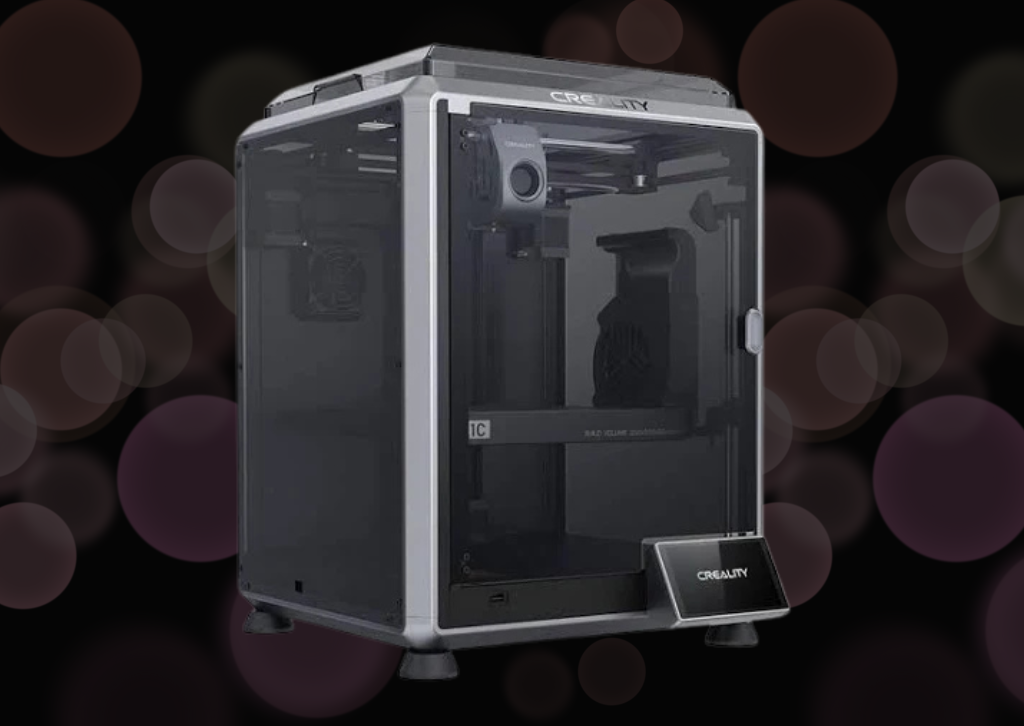
The 3D printing landscape has evolved dramatically over the past few years, with manufacturers racing to deliver faster, more reliable, and user-friendly machines. Creality, a household name in the maker community, has thrown its hat into the high-speed printing ring with the K1C. This printer represents a significant departure from Creality’s traditional Ender series, embracing enclosed design, CoreXY kinematics, and impressive speed claims. After extensive testing, here’s my in-depth look at what the K1C brings to the table.
First Impressions and Unboxing
The K1C arrives in a surprisingly compact box considering it’s a fully enclosed printer. Creality has done an excellent job with packaging—every component is snugly fitted with foam inserts, and there’s minimal risk of damage during shipping. The unboxing experience feels premium, which is a nice touch at this price point.
Inside the box, you’ll find the printer itself, a spool holder, tools, spare parts, a scraper, and a USB drive with test files and documentation. The printer comes mostly assembled, which dramatically reduces setup time compared to kit-style printers. This is clearly aimed at users who want to get printing quickly rather than those who enjoy the building process.
Design and Build Quality
The K1C features a fully enclosed metal frame with acrylic panels, which immediately sets it apart from open-frame designs. The enclosure serves multiple purposes: it maintains consistent temperatures for better print quality with materials like ABS and ASA, reduces noise, and provides an added layer of safety. The build volume of 220 x 220 x 250mm is respectable for a printer in this class, though not the largest available.
The CoreXY motion system is one of the K1C’s defining features. Unlike traditional bed-slingers where the print bed moves in the Y-axis, CoreXY printers keep the bed stationary on the Z-axis while two motors work in tandem to move the print head in the X and Y directions. This design enables the impressive speeds Creality advertises—up to 600mm/s with acceleration rates of 20,000mm/s². In practice, you’ll typically print between 150-300mm/s, but even these speeds represent a massive improvement over traditional FDM printers.
The build quality is solid overall. The frame feels rigid with minimal wobble, and the panels fit together reasonably well. However, some users have reported minor gaps in panel alignment, though this doesn’t seem to affect print quality. The machine has a nice weight to it, which helps with stability during those high-speed prints.
Setup and Calibration
Getting the K1C up and running is refreshingly straightforward. After removing the packaging materials and protective films, you’ll need to install the spool holder, load filament, and run through the initial calibration routine. The entire process takes roughly 30 minutes if you’re methodical about it.
The printer features automatic bed leveling with a strain gauge sensor, which is a significant convenience feature. The bed leveling process creates a mesh that compensates for any minor irregularities in the build surface. While the system works well, I found it beneficial to occasionally verify the first layer and make minor Z-offset adjustments through the touchscreen interface.
One standout feature is the input shaping calibration. The K1C uses an accelerometer to measure resonances in the printer’s frame and automatically adjusts the firmware to compensate. This technology, borrowed from the high-end Voron and Klipper community, helps maintain print quality at higher speeds by reducing ghosting and ringing artifacts.
Print Quality and Performance
This is where the K1C truly shines. The print quality at moderate speeds (150-200mm/s) is exceptional. Layer lines are consistent, overhangs handle well up to about 60 degrees without support, and bridging performance is impressive. The 0.4mm brass nozzle that comes standard produces clean details, and the printer handles intricate geometries with confidence.
When you push the speeds higher—into the 250-300mm/s range—quality remains surprisingly good, though you’ll start to see minor compromises. Fine details may soften slightly, and you might notice increased ringing on sharp corners despite the input shaping. However, for functional parts where speed matters more than aesthetics, these speeds are absolutely viable.
The heated bed reaches 100°C quickly, typically in under five minutes, and maintains temperature consistently. The PEI-coated spring steel build plate provides excellent adhesion for most materials, and prints pop off easily once the bed cools. I’ve tested PLA, PETG, ABS, and TPU, and all performed admirably with appropriate settings.
The enclosed design really benefits higher-temperature materials. ABS prints came out with minimal warping, and layer adhesion was strong. The chamber doesn’t actively heat beyond what the bed and hotend provide, but the passive warming is sufficient for most applications.
The Hotend and Extrusion System
The K1C features a direct drive extruder with a titanium alloy heatbreak and ceramic heater. The hotend can reach 300°C, which opens the door to engineering materials like nylon and polycarbonate. The all-metal hotend design means you won’t have PTFE tube degradation issues at higher temperatures.
The extrusion system is robust and handles flexible filaments better than many Bowden-style printers. I successfully printed TPU at 40mm/s without issues, which speaks to the quality of the extruder design. Filament loading and unloading are straightforward, though the quick-release mechanism occasionally requires an extra press to fully engage.
User Interface and Connectivity
The K1C sports a 4.3-inch color touchscreen that’s responsive and intuitive. The menu system is logically organized, making it easy to adjust temperatures, start prints, and modify settings. The interface shows real-time information including temperatures, print progress, and estimated time remaining.
Connectivity options include USB drive, USB cable to computer, and Wi-Fi. The Wi-Fi functionality is particularly convenient—you can send files to the printer over your network using Creality Cloud or through your slicer of choice. The integration works smoothly, though I experienced occasional connection drops that required reconnecting to my network.
Creality Cloud offers remote monitoring through a built-in camera, allowing you to check on prints from your phone. The camera quality is adequate for monitoring, though not high-definition. Time-lapse functionality is built in, which is a fun addition for sharing your prints on social media.
Noise Levels
One area where the K1C impresses is noise management. The enclosure naturally dampens sound, and the fans, while audible, aren’t particularly loud. During printing, the machine produces a gentle whirring rather than the aggressive mechanical sounds of many 3D printers. At typical speeds, it measures around 50-55 dB, which is roughly equivalent to a normal conversation. You could feasibly run this printer in a home office without it being overly disruptive.
Software and Slicing
The K1C runs Klipper firmware, which is a significant advantage. Klipper is highly regarded in the 3D printing community for its advanced features and flexibility. However, accessing these features requires some technical knowledge, as Creality has simplified the interface for general users.
For slicing, Creality provides profiles for Creality Print (their branded version of Cura), but the printer works with any slicer that supports Klipper. I primarily used Cura and PrusaSlicer with custom profiles, both of which worked excellently. The learning curve involves understanding how to balance speed, acceleration, and cooling for optimal results.
Maintenance and Reliability
After several months of regular use, the K1C has proven reliable with minimal maintenance required. The belt tension remains consistent, and I haven’t needed to re-tighten anything. The nozzle should be cleaned periodically, and checking for loose screws after heavy use is good practice.
One consideration is that the high-speed printing does put more wear on components than traditional printers. The fans work harder, and belts experience more stress. Creality provides decent documentation for common maintenance tasks, and replacement parts are readily available.
The biggest frustration I’ve encountered involves the bed adhesion surface. After hundreds of hours of printing, the PEI coating shows wear in the center where most prints occur. A replacement sheet isn’t expensive, but it’s an ongoing cost to factor in.
Value Proposition
Priced in the mid-range segment, the K1C represents solid value for what you’re getting. You’re receiving an enclosed CoreXY printer with advanced features like input shaping, auto-leveling, and Klipper firmware at a price point that undercuts many competitors. When you consider the speed capabilities and print quality, it becomes an attractive option for both hobbyists looking to upgrade and small businesses needing production capability.
That said, it’s not without competition. Bamboo Lab’s printers offer similar speeds with arguably more polished software experiences, while Prusa’s latest offerings provide legendary reliability with different trade-offs. The K1C carves out its niche by offering excellent performance at an accessible price.
Who Should Buy the K1C?
The Creality K1C is ideal for intermediate to advanced users who want high-speed printing without breaking the bank. If you’re upgrading from an Ender 3 or similar printer, the jump in capability will be dramatic. The printer is also well-suited for small businesses or makers who need to produce parts quickly without sacrificing too much quality.
Absolute beginners might find the speed and features somewhat overwhelming initially, though the printer is certainly usable out of the box. Those who enjoy tinkering will appreciate the Klipper firmware and the ability to modify and tune settings extensively.
Final Verdict
The Creality K1C represents a strong entry in the high-speed 3D printer market. It delivers on its core promises: fast printing speeds, good quality output, and a feature set that punches above its price point. The enclosed design, CoreXY kinematics, and Klipper firmware create a compelling package that handles a wide range of materials and applications.
While it’s not perfect—the software experience could be more polished, and build quality has minor inconsistencies—these are relatively minor quibbles in the context of what the printer achieves. For anyone looking to significantly reduce print times while maintaining quality, the K1C deserves serious consideration. It’s a printer that makes high-speed 3D printing accessible without requiring a premium price tag, and that’s exactly what the market needs right now.
Visit our 3D printer catagory for more 3D Printer Reviews
3-D Printers
Bambu Lab X1C Combo 3D Printer Review: A Revolution in Desktop 3D Printing

Bambu Lab X1C Combo 3D Printer Review
Welcome to The Tech Review, where we dive deep into the latest gadgets and technology to help you make informed decisions. Today, we’re putting one of the most talked-about machines in the 3D printing world to the test: the Bambu Lab X1C Combo. Since its launch, this printer has been praised for its speed, automation, and ability to “just work” right out of the box, something that has historically been a challenge for many desktop FDM printers. But does it live up to the hype? Let’s find out.
The Bambu Lab X1 Carbon Combo is a fully-enclosed, high-speed CoreXY 3D printer that bundles the X1 Carbon with the Automatic Material System (AMS). The AMS is the star of this combo, enabling multi-color and multi-material printing, a feature previously reserved for very expensive industrial machines or complex DIY setups. From the moment you unbox it, the experience feels different. It arrives fully assembled, and after a quick unboxing and a few screw removals, the printer’s automated setup process handles the rest, including a dual auto bed leveling routine that uses both a Micro Lidar sensor and an analog force sensor for unparalleled precision.
This printer is a powerhouse, boasting a maximum toolhead speed of 500 mm/s and acceleration of 20,000 mm/s². These speeds, combined with a 7 μm Lidar resolution, Active Vibration Compensation (AVS), and a hardened steel nozzle, allow it to produce incredibly fast prints without sacrificing quality. The AI-powered first layer inspection and “spaghetti” failure detection are game-changers, actively monitoring for common print issues and pausing the job to prevent wasted filament and time. This level of automation means you can confidently start a print and walk away, a major shift from the constant tinkering required by many other printers.
For more advanced users, the Bambu Lab X1C Combo supports a wide range of materials, including PLA, PETG, ABS, ASA, TPU, and more exotic filaments like PA, PC, and carbon/glass fiber reinforced polymers. The included hardened steel nozzle and all-metal hotend (capable of reaching 300°C) make printing with these abrasive materials a breeze. The AMS unit also keeps your filament dry, which is essential for successful prints with hygroscopic materials. While multi-color printing is a fantastic feature, it’s worth noting that it can be a slow process due to the filament purging required for color changes, which also results in a significant amount of plastic waste (the infamous “poop chute”).
The Bambu Lab software ecosystem—including the Bambu Studio slicer and the Bambu Handy mobile app—is incredibly polished and user-friendly. The integration is seamless, allowing for remote printing and monitoring with the built-in 1080p camera. While this cloud-based approach is convenient, it’s a point of contention for some users who prefer open-source hardware and local control for security and long-term viability. However, for the average user, the “it just works” philosophy of the Bambu Lab ecosystem is a massive selling point.
Features & Specifications
- Technology: Fused Deposition Modeling (FDM)
- Motion System: CoreXY with Carbon Fiber Rails
- Build Volume: 256×256×256 mm³
- Max Speed of Toolhead: 500 mm/s
- Max Acceleration: 20,000 mm/s²
- Nozzle: 0.4 mm Hardened Steel (included), 0.2, 0.6, 0.8 mm (optional)
- Max Hot End Temperature: $300^{\circ}$C
- Max Build Plate Temperature: $120^{\circ}$C
- Build Plate Surface: Bambu Textured PEI Plate or Bambu Cool Plate
- Supported Filaments: PLA, PETG, TPU, ABS, ASA, PVA, PET, PA, PC, Carbon/Glass Fiber Reinforced Polymer
- Auto-Leveling: Dual Auto Bed Leveling (Lidar & Force Sensor)
- AI Features: First Layer Inspection & Spaghetti Detection
- Camera: Built-in 1080p camera for remote monitoring and timelapse
- Connectivity: Wi-Fi, MicroSD Card
- Included: Automatic Material System (AMS) for 4-color printing
- Display: 5-inch color LCD touchscreen
- Dimensions: 389×389×457 mm³ (without AMS)
Who Is This Printer Best For?
The Bambu Lab X1C Combo is an excellent choice for a wide range of users, but it particularly shines for those who value speed, automation, and ease of use over the ability to tinker.
- Hobbyists who want a “just works” machine: If you’re a maker or hobbyist who wants to spend more time designing and less time calibrating and troubleshooting, the X1C is perfect.
- Professionals and small businesses: The printer’s reliability, speed, and ability to handle engineering-grade filaments make it ideal for creating prototypes, functional parts, and high-quality models in a professional setting.
- Anyone new to multi-color printing: The AMS simplifies what has traditionally been a very difficult process, making multi-color projects accessible to a much broader audience.
Pros and Cons
| Pros | Cons |
|---|---|
| Blazing Fast Speeds: Drastically reduces print times compared to conventional printers. | High Price Tag: Positioned at the higher end of the consumer market. |
| Exceptional Out-of-the-Box Experience: Arrives fully assembled and ready to print with minimal setup. | Closed-Source Ecosystem: Limits user customization and third-party parts. |
| Automated & Intelligent: Features like Lidar and AI detection save time and filament by preventing print failures. | Significant Filament Waste: Multi-color printing requires purging, creating a “poop chute” of wasted plastic. |
| Multi-Color & Multi-Material: The AMS system provides a seamless and reliable way to print with up to 4 filaments at once. | Proprietary Parts: Replacement parts must be sourced directly from Bambu Lab, which can be a single point of failure. |
| Robust & High-Quality Prints: The CoreXY system and rigid frame ensure consistent, high-quality results. | Cloud Dependency: The software ecosystem is heavily reliant on cloud services for remote functionality. |
| Wide Material Compatibility: Can print with a variety of standard and advanced filaments. | Noise: Can be loud at top speeds. |
Competitor Comparison
| Feature | Bambu Lab X1C Combo | Prusa MK4 | Creality K1 |
|---|---|---|---|
| Price (approx.) | $1,449 | $1,099 (assembled, single color) + $299 (MMU3) + Enclosure | ~$699 |
| Core Technology | CoreXY (fast) | Bed Slinger (slower) | CoreXY (fast) |
| Multi-Color/Material | Yes, with included AMS (up to 4) | Yes, with optional MMU3 (up to 5) | No |
| Automation | Highly automated (Lidar, AI detection) | Advanced (Nextruder, Load Cell) | Basic |
| Max Speed | 500 mm/s | 300 mm/s (with input shaping) | 600 mm/s |
| Enclosure | Fully Enclosed | Optional | Fully Enclosed |
| Open/Closed Source | Closed Source | Open Source | Open/Closed Hybrid |
| Community Support | Growing, active | Extensive, well-established | Extensive, well-established |
Q&A
Q: Is the Bambu Lab X1C Combo suitable for a beginner? A: Yes, absolutely. While it’s a high-end, professional-grade machine, its plug-and-play nature and comprehensive automation make it an incredibly forgiving and user-friendly experience for beginners. The “just works” philosophy is a huge advantage for those who don’t want to spend their time troubleshooting.
Q: What is the main difference between the X1C Combo and the P1S Combo? A: The main differences lie in the features. The X1C includes a Lidar sensor for advanced bed leveling and first-layer inspection, a built-in camera, and a full-color touchscreen. It also has a hardened steel nozzle and more robust cooling, making it better suited for abrasive filaments. The P1S is essentially a more budget-friendly version that sacrifices these premium features for a lower price point while maintaining the high-speed core functionality and AMS compatibility.
Q: How much filament is wasted with multi-color printing? A: The amount of waste depends on the design of the model. The AMS system purges a small amount of filament during each color change to prevent color mixing, creating a small “poop” of plastic. For a two-color print, this is manageable, but for a four-color print with many color changes, the waste can be significant. However, for many users, the convenience of not having to manually swap filaments outweighs this downside.
Q: Can I use third-party filaments with the AMS? A: Yes, you can. While the Bambu Lab filaments have RFID tags that allow the printer to automatically apply the correct settings, you can manually configure the filament type and color for any third-party brand. The AMS is designed to work with most standard 1.75 mm filament spools.
Q: What is the Lidar sensor used for? A: The Micro Lidar sensor is a key feature of the X1C. It is used to perform a high-precision first-layer scan to ensure proper adhesion and detect any imperfections. It also helps with flow calibration and provides a redundant check to the bed leveling process, ensuring consistently perfect first layers.
Q: Is the cloud connectivity a problem? A: This is a matter of personal preference. Cloud connectivity enables the printer’s most convenient features, like remote printing and monitoring via the mobile app. However, it means your printer is dependent on Bambu Lab’s servers. It is possible to use the printer with local network mode by sending files via a microSD card, but you would lose some of the remote functionality.
Q: How is the maintenance on the Bambu Lab X1C Combo? A: The X1C is a very complex, yet modular, machine. It’s not designed for the same level of tinkering as open-source printers like the Prusa MK4. Most repairs involve replacing an entire assembly (e.g., the hotend), which is a quick and straightforward process. While this makes it easy for the average user, it can be a turn-off for those who prefer to repair individual components.
Q: How does the “spaghetti detection” work? A: The built-in AI is trained to recognize the common patterns of a print failure, often referred to as “spaghetti.” If the AI detects a print has failed and is creating a tangled mess of filament, it will automatically pause the print and send a notification to the user, preventing a huge mess and saving a lot of filament.
Visit our 3D printer catagory for more 3D Printer Reviews


DeleteMe: Your Digital Privacy Guardian in an Age of Data Exploitation

The Mid-Range Redefined: A Comprehensive Review of the Nikon Z6 III

The Canon PowerShot ELPH 360 HS: A Deep Dive into the Pocket-Sized Powerhouse

Sony FE 16mm f/1.8 G Review: The Ultra-Wide Prime for the Modern Creator

The Guardian of Your Threshold: An In-Depth Review of the Google Nest Doorbell

Clash of the Titans: 13″ iPad Pro M4 vs. Samsung Galaxy Tab S10 Ultra – Which Premium Tablet Reigns Supreme?
-
 Photography12 months ago
Sony FE 16mm f/1.8 G Review: The Ultra-Wide Prime for the Modern Creator
-
 Home Tech1 year ago
The Guardian of Your Threshold: An In-Depth Review of the Google Nest Doorbell
-
 Tablets1 year ago
Clash of the Titans: 13″ iPad Pro M4 vs. Samsung Galaxy Tab S10 Ultra – Which Premium Tablet Reigns Supreme?
-
 Computers1 year ago
Asus ProArt Display 6K PA32QCV Review: A Visual Feast for Professionals
-

 Computers1 year ago
ASUS Zenbook Duo: A Pretty Awesome Dual-Screen Laptop
-

 Photography1 year ago
Adobe’s “Project Indigo” is the iPhone Camera App We’ve Been Waiting For, and It’s Awesome
-

 Home Tech1 year ago
Revolution R180 Connect Plus Smart Toaster: More Than Just Toast?
-

 Health Tech1 year ago
Lumen Metabolism Tracker: A Deep Dive into Your Metabolic Health
-

 Photography12 months ago
DJI Osmo 360 go: The Next Generation of Immersive Storytelling?
-

 Computers1 year ago
Apple Mac Studio Review: A Desktop Powerhouse Redefined
-

 Computers1 year ago
Samsung 15.6” Galaxy Book5 360 Copilot AI Laptop: A Deep Dive into the Future of Productivity
-

 Wearables12 months ago
Bowers & Wilkins Pi8 McLaren Edition Review: A Supercar for Your Ears?